


Using as a wireless mouse
-
Press the power button (A) on the mouse for about 2 seconds.

The mouse turns on and the status indicator flashes twice in white.

-
Connect the supplied USB Type-C cable (B) to the USB Type-C port on the wireless dongle.

-
Connect the USB Type-C cable that is connected to the wireless dongle to a USB port on a computer.
The wireless dongle turns on.
When the mouse connects wirelessly to the wireless dongle, the status indicator on the wireless dongle lights up in white.
The computer automatically recognizes the mouse.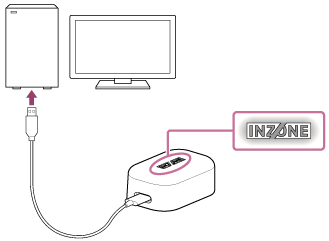
-
Use the mouse as a wireless mouse.Keep the mouse and wireless dongle as close as possible.
Note
- If the mouse cannot connect to the wireless dongle, the status indicator on the mouse flashes in white.
- When connecting the wireless dongle to a computer or starting up a computer, do not move the mouse until the mouse is recognized.
- When connecting the wireless dongle to a computer, be sure to connect it directly to the computer without using a USB hub, etc.
- The mouse may not work or may become unstable depending on the status of the computer and operating system. In this case, see “What can I do to solve a problem?”.
- When reconnecting the wireless dongle after removing it from a USB port on a computer, wait about 5 seconds before reconnecting it. The mouse may not be recognized.
- Always remove the wireless dongle when carrying a laptop computer. Carrying a laptop computer with the wireless dongle connected may cause damage.
- The wireless dongle is for the Wireless Gaming Mouse only. The wireless dongle cannot be used for other mice.
Hint
- When the mouse is connected wirelessly to a computer and will not be used for a while, you can save battery power by pressing the power button on the mouse for about 2 seconds to turn off the mouse .