


Center Lock-on AF
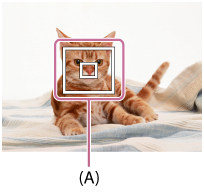
When you press the center of the control wheel, the camera detects the subject positioned in the center of the screen and continues to track the subject.
-
MENU →
 (Camera Settings1) → [Center Lock-on AF] → [On].
 -
Align the target frame (A) over the subject and press the center of the control wheel.
- Press the center again to stop tracking.
-
Press the shutter button fully down to shoot the image.
Hint
- If you assign the [Focus Standard] function to the key of your choice, you can activate [Center Lock-on AF] or detect a subject again by pressing the key when [Focus Area] is set to [Wide] or [Center].
-
You can select the subject to be tracked by touch operation when shooting using the monitor.
With touch panel operations enabled, select MENU →
 (Camera Settings2) → [Func. of Touch Oprtn] → [Touch Focus].
Note
- The [Center Lock-on AF] function may not function very well in the following situations:
- The subject is moving too quickly.
- The subject is too small, or too large.
- The contrast between the subject and the background is poor.
- It is dark.
- The ambient light changes.
- Lock-on AF does not work in the following situations:
- [Sweep Panorama]
- When [Scene Selection] is set to [Hand-held Twilight], [Anti Motion Blur] or [Fireworks].
- When shooting in the Manual Focus or Direct Manual Focus (DMF) mode.
- When using the digital zoom
-
When the shooting mode is set to Movie, and [
 SteadyShot] is set to [Intelligent Active].
-
When shooting movies with [Record Setting] set to [120p]/[100p]
