


List of icons on the screen for shooting movies
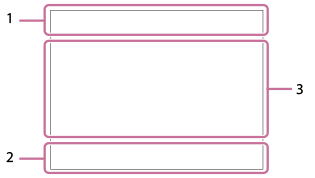
The icons displayed when the camera is held horizontally are explained. The displayed contents and their positions in the illustrations are just guidelines, and may differ from the actual displays.
- The icon display positions may differ when the camera is held vertically. For the information display when the camera is held vertically, refer to “ Vertical Display .”
- The displayed contents may vary depending on your camera’s system software (firmware) version.
Hint
- In addition to the icons described on this page, there are more icons for touch operations (touch function icons) that are displayed on the left or right side of the screen when you swipe the monitor. For details, refer to “Touch function icons.”
- Basic camera settings
-
- Audio level
-

- Audio recording off
-


- Focus Mode
- S-log3 s709 709(800%) User1 LUT OFF
- LUT
- STBY REC
- Movie recording standby/Movie recording in progress
- 8K 4K HD
- File format of movies
- 120p 100p 60p 50p 30p 25p 24p
- Frame rate of movies
-


- Memory card for recording / Not memory card for recording
- NO CARD
- No memory card inserted
-


- Nearing the rewriting upper limit of the memory card / Rewriting upper limit of the memory card reached
- 1h 30m
- Recordable time of movies
-

- Writing data / Number of images left to write
-

- Remaining battery
-

- Remaining battery warning
-

- USB power supply
-
- Exposure and other settings
- 1/250
 1/250
1/250
- Shutter speed
- F3.5
F3.5
- Aperture value
-


- Exposure compensation/Metered Manual
- ISO400
ISO 400
- ISO sensitivity
-


 7500K A5 G5
 - White Balance (Auto, Preset, Underwater Auto, Custom, Color temperature, Color filter)
-


- AE lock/AWB lock
-

-

 Shooting
- 1/250
- Other settings
-


- Shooting mode
-


- Shooting mode (Registered shooting settings)/
 Automatic Update
-


- Scene Recognition icons
-


- REC Control
-


- 4K/RAW external output
- 1:00:12
- Actual movie recording time (hours: minutes: seconds)
- 00:00:00.00
- Time code (hours: minutes: seconds. frames)
- 00 00 00 00
- User Bit
- Spot Focus
- Performing [Spot Focus]
- x4 Slow x4 Quick
- Slowness/quickness scale during slow-motion/quick-motion shooting
-

- Movie self-timer
-


- Clear Image Zoom/Digital Zoom
-


- Gamma Disp. Assist Typ.
-

- Dual Gain Shooting
-


- Starting/stopping network streaming output
- High / Standard / Low / HD (1080p) 60p 9.0M
- Image quality setting for network streaming output
- Streaming : Standby / Output / Connecting / Connect. Err. / Not Connect
- Network streaming status
- 4K(2160p) 30p / 4K(2160p) 25p /4K(2160p) 15p / 4K(2160p) 12.5p / HD(1080p) 60p / HD(1080p) 50p / HD(1080p) 30p / HD(1080p) 25p / HD(720p) 30p / HD(720p) 25p
- USB streaming output format
- Streaming : Standby / Streaming : Output
- USB streaming status
-
 Tracking Cancel
 - Guide display for tracking
- Focus Cancel
- Guide display for canceling focusing
-
Tracking+AE Cancel
- Guide display for tracking+AE
-
Focus+AE Cancel
- Guide display for focus+AE
-
Touch AE Cancel
- Guide display for touch AE
-
Lock Composition/ Cancel Lock Composition
- Guide display for locking the composition with [Framing Stabilizer]
- 48kHz/16bit 2ch 48kHz/32bit float 4ch 96kHz/24bit 2ch 96kHz/32bit float 4ch
- Audio format
-
 32f
32f
- 32bit float WAV Rec.
-

- Guide display for dials
-

- Anti-flicker Tv Scan
-

- Focus Cancel
-


- Touch Focus+AE cancel/TouchTracking+AE cancel/Touch AE cancel
-

- Tracking Cancel
-


- Lock composition/Cancel lock composition
-


- Remote Shooting (connected) / Remote Shooting (connection error)
-


- Connected to the cloud/Communicating with the cloud/Cloud connection error
-



- Connected with FTP / FTP communication in progress / FTP connection error
-


- Transferring to smartphone / Transfer error
-

- Airplane Mode
-


- Connected to Wi-Fi (via a Wi-Fi access point)
-

- Disconnected from Wi-Fi (via a Wi-Fi access point)
-


- Connected to Wi-Fi/Disconnected from Wi-Fi (Wi-Fi Direct)
-


- Connected to LAN/Disconnected from LAN (When using a USB-LAN conversion adaptor)
-


- Bluetooth connection available / Bluetooth connection unavailable
-

- Remote control
-


- Obtaining location information / Location information cannot be obtained
-


- Metering Mode
-


-
D-Range Optimizer
-

- Histogram
-

- Digital level gauge
-

- Overheating warning
-


- Database file full / Database file error
-
Hint
- Area 3 icons may not be displayed while the touch function icons are displayed. To see hidden icons, swipe the touch function icons left or right to hide the touch function icons.
TP1002372453