


Bottom
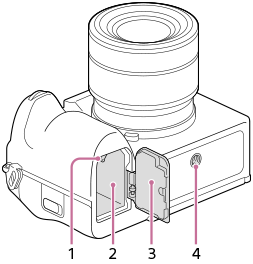
- Lock lever
- Battery insertion slot
- Battery cover
When attaching an accessory such as a vertical grip (sold separately), remove the battery cover.
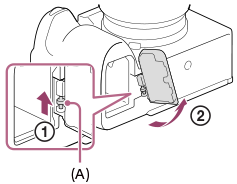
To remove the battery cover
Pull the battery cover release lever (A) in the direction of the arrow, and then remove the battery cover.
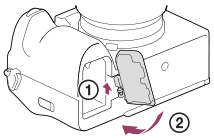
To attach the battery cover
Insert the shaft on one side of the battery cover into the attachment site, and then push in the battery cover by attaching the shaft on the opposite side.
- Tripod socket hole
Supports 1/4-20 UNC screws
Use a tripod with a screw less than 5.5 mm (7/32 inches) long. Otherwise, you cannot firmly secure the camera, and damage to the camera may occur.
Hint
About the paid replacement battery cover part
You can use a DC coupler (sold separately) with the battery cover closed if you purchase the paid replacement battery cover part.
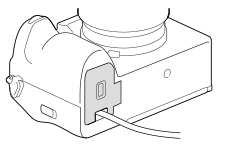
Refer to the following support site for inventory confirmation and purchase. When purchasing, please let us know the product name and product number.
The availability of the paid replacement battery cover part may vary depending on the country or region.
Sony service facility
https://www.sony.net/support-contact
- Product name: BT COVER FOR DC COUPLER (sold separately)
- Product number: X-5005-359-1
If you use the battery cover outdoors in the rain, etc., water droplets or moisture may get inside the camera.