Front side

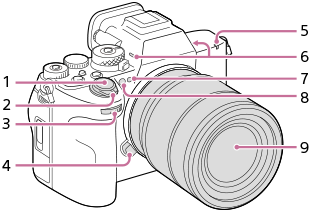
This is an illustration of the front side of the camera. The side where the lens is attached is considered the front of the camera. The lens, number 9, is in the center of the front. Located diagonally above and to the left of the lens, there are buttons and controls numbered 1 to 3. The button numbered 4 is on the left side of the lens. Above the lens, from right to left, there are parts numbered 5 to 8.

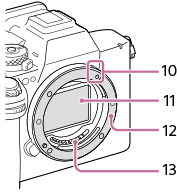
This is an illustration of the camera with the lens removed. The lens mount, number 12, is in the center of the front. Part number 10 is located on the top right of the lens mount. Parts number 11 and number 13 are located inside the lens mount.

  1. Shutter button
  2. ON/OFF (Power) switch
  3. Front dial

    You can quickly adjust the settings for each shooting mode.

  4. Lens release button
  5. Recording lamp
  6. Microphone

    Do not cover this part during movie recording. Doing so may cause noise or lower the volume.

  7. Visible light and IR sensor

    Do not cover this part during shooting.

  8. AF illuminator/Self-timer lamp

    Do not cover this part during shooting.

  9. Lens
  10. Mounting index

    There is a bar-shaped protrusion on the side of the lens mount. Use the protrusion as a guide for operation.

  11. Image sensor*
  12. Mount
  13. Lens contacts*

* Do not directly touch these parts.

TP1002214761