


Illumination Settings
You can set the illumination for the buttons on the rear side of the camera. By turning on the illumination for the buttons, you can identify them visually even in dark environments.
The buttons that will be illuminated are as follows:
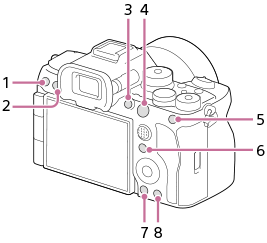
- C3 (Custom 3) button
- MENU (menu) button
- C1 (Custom 1) button
- AF-ON (AF On) button
- AEL button
- Fn (function) button
-
 (playback) button
 -
 (delete) button
-
MENU →
 (Setup) → [Setup Option] → [Illumination Settings] → desired setting item.
Menu item details
- Illumination:
- Sets how to turn on the illumination for the buttons.
- [Always On]: The illumination for the buttons always turns on while the camera is turned on.
- [C.Key On: TimeOut]: The illumination for the buttons will turn on if you press the custom key to which [Illumination On] has been assigned and turns off after a certain period of time.
- [Always Off]: The illumination for the buttons does not turn on.
- Illumination Brightness:
- Sets the brightness of the illumination for the buttons. ([High]/[Mid]/[Low])
Hint
- When [C.Key On: TimeOut] is selected, after pressing the custom key to turn on the illumination for the buttons, you can turn off the illumination by pressing the custom key again while the illumination for the buttons is lit.
- In the default settings, [Illumination On] is assigned to the
 (Illumination) button.
Note
- The illumination for the buttons turns off in the following situations.
- Autofocusing in progress
- Shooting a still image
- Recording a movie
- During the countdown for the self-timer in the still-image shooting mode and movie shooting modes
- While updating of the firmware of the camera or the lens
- When [Illumination] is set to [Always On], power consumption becomes higher than usual.
TP1002379809