Connecting to LiveU Central from PWA-RXS and Configuring LiveU Transmitters/Receivers
You can connect a camera to a LiveU transmitter and upload clips recorded by the camera to PWA-RXS via LiveU transmitter/receiver.
Initial setup
If using LiveU products, a separate LiveU transmitter and LiveU receiver are required. You need to enter into a contract with LiveU, register your LiveU transmitter/receiver using the LiveU Central GUI, and obtain a license.
Additionally, you will need to obtain information from LiveU about how to connect from PWA-RXS to LiveU Central and configure settings in PWA-RXS. For details, refer to the LiveU documentation.
-
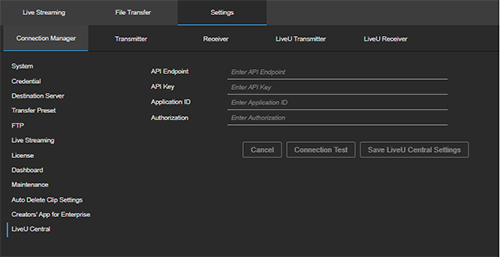
Select [Settings] > [Connection Manager] tab > [LiveU Central] from the global header of the connection manager.
-
Configure the connection information obtained beforehand from LiveU.
-
Click [Connection Test]. If the connection is successful, click [Save LiveU Central Settings].
When the connection to LiveU Central is successful, you can obtain the LiveU transmitter/receiver information.
-
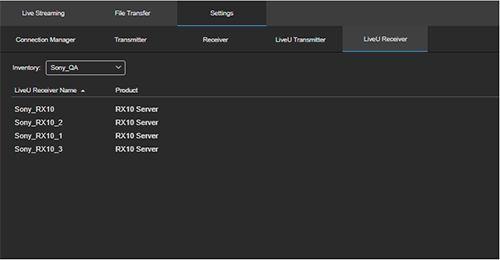
Click [Settings] > [LiveU Receiver] tab.
Use to check the information for LiveU receivers.
-
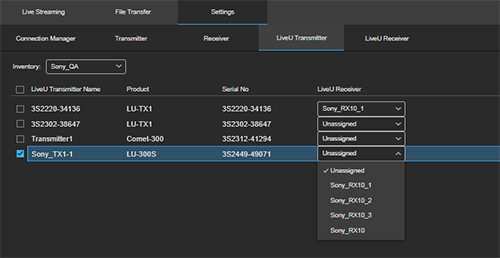
Click the [LiveU Transmitter] tab.
Use to check the information for LiveU transmitters.
-
Select a LiveU transmitter and assign a LiveU receiver using [LiveU Receiver].
Once assigned, clips will be uploaded to PWA-RXS from the LiveU transmitter via the LiveU receiver.