


Features
PWA-RXS is a PC application that allows you to build a camera gateway for receiving content transferred from cameras at an on-site shooting location in an on-premises environment. It supports the building of a variety of content transfer workflows in combination with compatible cameras, such as Sony XDCAM and Cinema Line, smartphones, portable data transmitters, and LiveU transmitters.
The following example shows a system configuration for transferring files and live streaming using PWA-RXS.
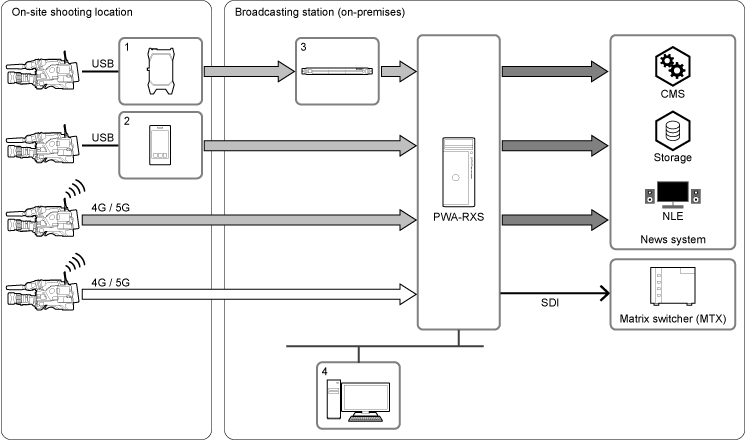
 : Uploading files (files/chunk files)
 : External file transfer (SMB, FTP, S3)
 : Live streaming (QoS, SRT)
1: LiveU transmitter
2: Creators' App for Enterprise
3: LiveU receiver
4: Client PC
■ File transfer
High-reliability, camera-native files recorded by a camera can be transferred directly without processing. Content and metadata can be transferred in a file format compliant with the industry-standard XDCAM format, which supports the transfer of timecode, GPS (location data), and other metadata.
Clips uploaded to PWA-RXS can be transferred (exported) as files to external systems (servers or storage). Uploading is supported using the following three methods.
- Uploading from a camera connected in network client mode
- Uploading from an app (Creators' App for Enterprise) installed on a smartphone or portable transmitter
- Uploading from a LiveU transmitter/receiver
Content can be transferred directly to locations selected by the on-site crew by configuring transfer destinations as presets beforehand.
■ Live streaming
PWA-RXS can receive live video transferred in real time from a camera equipped with a live streaming function and output the video from an SDI connector.
Live streaming in Sony QoS format and SRT format is supported.
Note
- To transmit live streaming from a camera, a camera with network functions is required. For supported cameras, refer to the release notes.
PWA-RXS is comprised by a connection manager that manages the connection between PWA-RXS instances and transmitters, such as cameras, and streaming receivers that receive live streaming video. The connection manager interface can be displayed in a web browser on a client PC, allowing centralized management of multiple connections.
Remarks
- Network services, content, operating systems, and software implemented in or available through PWA-RXS are subject to their own terms of use. Note that services may be interrupted, terminated, or their content changed without prior notice.
- Connect PWA-RXS to the internet via a router or firewall. If connected without such protection, security issues may occur.
Note
- Once a security issue occurs, your product may suffer damage caused by malware (malicious software) via the Internet and be exposed to security threats, such as extraction or tampering of content or customer’s information. Your product may also cause damage to network services without your knowledge.