


What you can do with ECM-AX10
The four microphones built into ECM-AX10 record sound from all directions—left, right, up, down, front, and back (spatial audio).
Using the “Spatial Audio Video Tool” app
You can record, play back, and edit using the dedicated app. The recorded data can be exported in formats for different purposes using the export function.
Hint
- In SPATIAL mode, recordings are made in [Ambisonics(4ch)] or [Binaural]. If you use any app other than the dedicated app, recordings are made only in [Binaural].
About the SPATIAL (spatial audio) Mode
The four microphones on ECM-AX10 capture three-dimensional spaces exactly as they are—including the direction, height, depth, and movement of sounds.
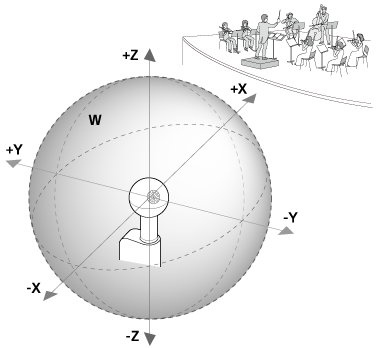
- +X: Front
- -X: Back
- +Y: Left
- -Y: Right
- +Z: Up
- -Z: Bottom
- W: All directions
Use the dedicated app to set the recording mode to [Ambisonics(4ch)] or [Binaural] depending on the viewing environment.
- [Ambisonics(4ch)]: Recorded in Ambisonics B-format (AmbiX).
You can convert and export files to the following audio output formats by using the “Spatial Audio Video Tool” app.- [Eclipsa Audio](*): Select this when creating Eclipsa Audio-compliant videos.
- [Binaural]: Select this when creating videos for a spatial audio format suitable for listening with headphones.
- [Stereo]: Select this when creating a video in two channels on the left and right in front.
- [Audio only: Ambisonics (4ch/WAV format)]: Select this when outputting only AmbiX-format audio data.
(*)Format that allows for the recording and reproduction of spatial audio in a multi-channel environment.
- [Binaural]: Recorded in the spatial audio format (Binaural) optimized for listening with headphones.
About the STEREO mode
The recordings are made in two channels on the left and right in front.
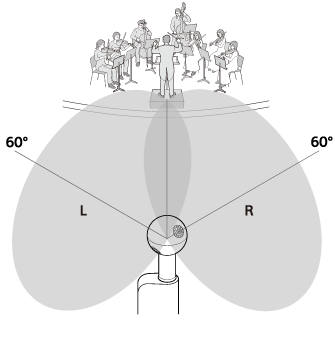
- L: Left
- R: Right
Hint
- The differences between [Binaural] and [Stereo] are as follows.
- [Binaural]: This is a spatial audio system with omnidirectional sound distribution optimized for listening with headphones.
- [Stereo]: This is a common sound system configuration with front-left and front-right directionality.
- If you are having trouble recording in SPATIAL mode using an app other than the dedicated one, try recording in STEREO mode.
Note
- Do not run any other video or audio recording apps while using the dedicated app. Also, when using an app other than the dedicated app, close the “Spatial Audio Video Tool” app.
TP1002508796