


Using the spacers
If there is a gap between the smartphone and microphone when you connect the microphone to the USB Type-C port on the smartphone, use the supplied spacers.
-
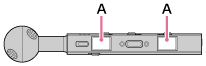
Stick the spacers to the left and right (A) of the USB Type-C connector on the microphone.
-
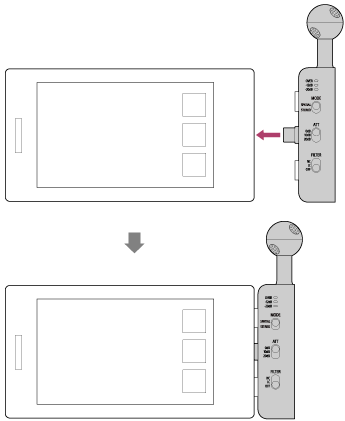
Connect the microphone to the smartphone and make sure there is no space between the microphone and the smartphone.
Hint
- If there is still space between the smartphone and microphone after attaching the spacers, stick on another layer of spacers.
Note
- Make sure the USB Type-C connector is fully inserted. If your device is in a case, for example, the USB Type-C connector may not connect properly, and the smartphone may not recognize the microphone.
- Remove the spacers when using the microphone holder.
TP1002508800