


Using the microphone holder
When securing the smartphone in landscape orientation, use a commercially available smartphone holder with a shoe mount and the supplied microphone holder.
-
Turn the microphone locking dial (B) on the microphone holder to the left to lower the mounting base (A) to its lowest position.

-
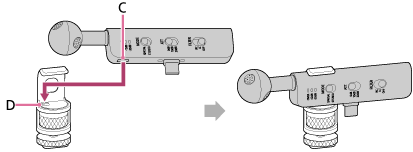
Align the recess on the side of the microphone (C) with the protrusion on the microphone holder (D), and install it so that it does not tilt relative to the upper arm mount.
-
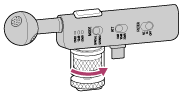
Turn the microphone locking dial on the microphone holder to the right to secure the microphone to the microphone holder.
Turn the dial so that the cushion on the arm part touches the microphone.
-
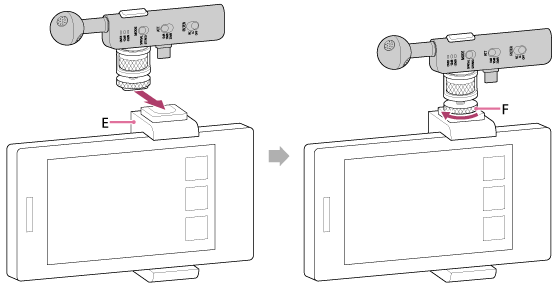
Attach the microphone holder to the smartphone holder (E), then turn the locking dial (F) to the left to secure it.
-
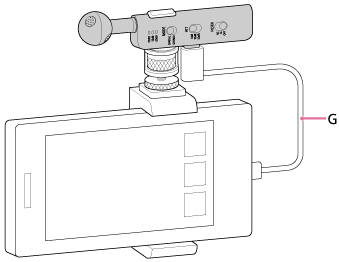
Connect the microphone to the smartphone using the supplied USB Type-C cable (G).
Note
- Be careful not to touch the cable while recording. This may cause some noise.
TP1002508799