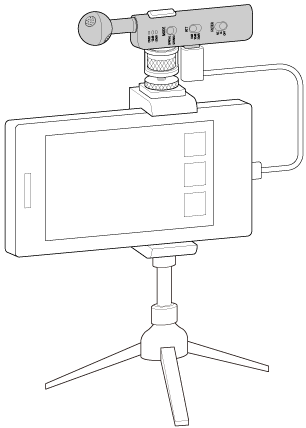
Connecting the microphone
Connecting the microphone to the smartphone directly
Connect the USB Type-C connector on the microphone to the USB Type-C port on the smartphone.
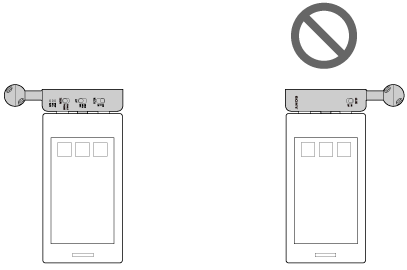
Connect the microphone so that the Sony logo faces the back of the smartphone. The microphone can be used in either portrait or landscape orientation.
-
When recording with the smartphone in landscape orientation with the microphone facing upward
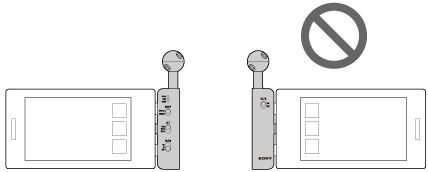
-
When recording with the smartphone in landscape orientation with the microphone facing down
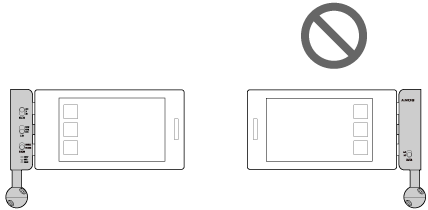
-
When recording with the smartphone in portrait orientation with the microphone under the smartphone
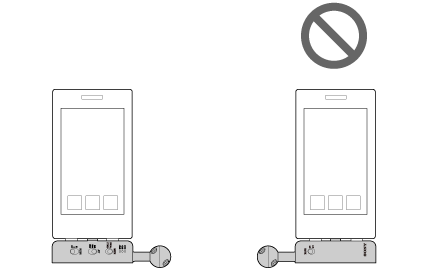
-
When recording with the smartphone in portrait orientation with the microphone on top of the smartphone
Hint
- If there is a gap between the smartphone and the microphone, causing instability, stick the spacers onto the microphone.
- We recommend using a tripod if you are concerned about camera shake or vibration noise.
Using a commercially available camera tripod
To securely mount the microphone, attach the microphone to a camera tripod using the supplied microphone holder.
Attach the microphone so that it faces the same direction as the smartphone.