


Using the wind screen
The wind screen reduces noise caused by wind or breathing hitting the microphone directly.
Attaching the wind screen
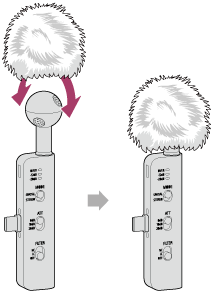
Spread out the fabric of the wind screen opening and pull the wind screen over the microphone until it completely covers the microphone part and the base of the microphone.
Removing the wind screen
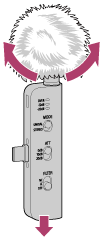
Pull the microphone while spreading the fabric over the windscreen opening.
Note
- When attaching or removing the wind screen, be sure to hold the edge of the fabric and pull it, taking care not to pull on the fur.
- If the wind screen gets wet, remove it from the microphone and let it air dry.
TP1002508798