


Location and function of parts
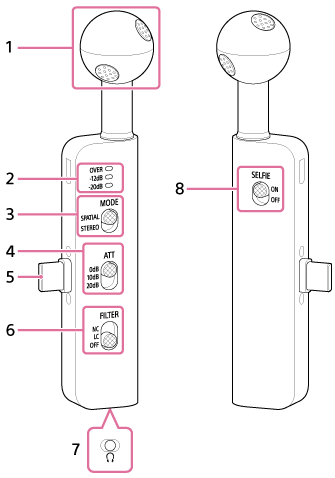
-
Microphone
-
Peak level meter
The indicator lights indicate the maximum peak level during recording.
If the “OVER” indicator light is on, distortion may occur.
When this is the case, set the ATT switch to “10dB” or “20dB.” -
MODE (mode) switch
Select the directionality of the sound being recorded.
- “SPATIAL” (spatial audio): Records the sound field in all directions—up, down, left, and right—as well as the depth from front to back.
- “STEREO” (stereo): Records with a focus on the front left and right channels.
-
ATT (attenuator) switch
Select the appropriate setting based on the volume of the audio to be recorded.
When recording loud sounds with minimal distortion, set this to “20dB.”
We recommend selecting a setting while checking the volume using the level meter on the dedicated app or the microphone.
-
USB Type-C connector
Connect to the USB Type-C port on the smartphone.
-
FILTER (filter) switch
- “NC” (noise cut): Select this when using the noise cut filter. This effectively removes stationary noise using digital signal processing. If the sound quality feels unnatural, set it to “OFF.”
- “LC” (low cut): Select this when using the low cut filter. This reduces unwanted noise such as wind noise, air conditioning noise, and vibration noise.
- “OFF”: Turns off the filter.
Note
- When holding the microphone in your hand in a quiet environment, faint vibration noise may be recorded. If you are concerned about vibration noise, try setting the FILTER switch to “LC.”
-
Headphone cable input jack (Φ3.5 mm)
Connect optional headphones to monitor the sound being recorded. The monitoring volume can be adjusted using the dedicated app.
-
SELFIE (selfie) switch
Select the direction of the sound being recorded. When recording with the smartphone’s front camera, set this to “ON.”