


Wearing the headset
-
Put the headset units into your ears.
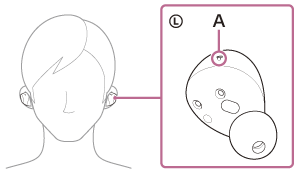
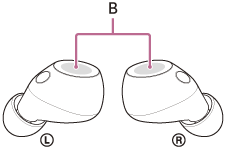
Put the headset unit with the L-mark into your left ear and the headset unit with the R-mark into your right ear. The left headset unit has a tactile dot (A).
Be careful not to touch with the touch sensor (B) when you put the headset units into your ears.
-
Adjust the fit of the headset units to your ears.
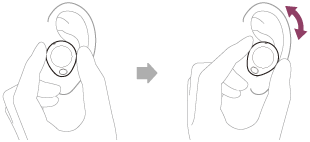
Twist the headset unit to slide the earbud tip deep into your ear canal.
Hint
- When you put the headset unit into your ear or adjust the positioning of the headset unit, see the illustration in step 2 for how to hold the headset unit.
For the proper sound quality, volume, noise canceling function, and call sound quality to be effective
If the earbud tip sizes do not match or the headset is not worn correctly, taps may not work properly. You may also not obtain the correct sound qualities, volume, noise canceling effects, or call performance.
If any of this is the case, try the following.
- Change the earbud tips to ones that fit more snugly in your ears. When changing the earbud tips, try the earbud tip sizes in order from the larger ones to the smaller ones. The most suitable size of the earbud tips for left and right ears may be different.
- Referring to step 2, check that you are wearing the headset properly in your ears. Wear the headset so that the earbud tip fits best.
When attaching and removing the headset
In the factory settings, the built-in IR sensors is enabled to detect if the headset units are inserted or removed from your ears. As a result, music may unintentionally play, pause, or resume, and the touch sensor actions and voice guidance may be controlled.
When the headset is worn
- You can use the touch sensors to perform actions such as playing music and making or receiving calls.
- You will hear a notification or voice guidance that corresponds to the operating procedure and status.
When the headset is removed
- When you listen to music while wearing both headset units in your ears, the headset will pause music playback if one or both headset units are removed. When the headset is worn again, the headset resumes music playback.
- When the headset units are not worn for about 15 minutes after being removed from the charging case, the headset turns off automatically to save battery. Turn the headset on by tapping the touch sensor or by putting the headset units into your ears.
- To prevent unintended actions, the touch sensors of the headset units do not respond to taps when they are removed from your ears.
Hint
- You can play music as well as make and receive calls even when you are wearing only one headset in your ear.
- You can use the “Sound Connect” app to change the settings that automatically pause and resume the music playback, or automatically turn off the headset.