


Listening to ambient sound quickly (Quick Attention Mode)
This function turns down music, call sounds, and the ringtone to allow ambient sound to be easily heard. The Quick Attention Mode is useful for quickly listening to train announcements, etc.
To activate the Quick Attention Mode
Hold your finger to the touch sensor on the left unit. The Quick Attention Mode is activated only when you are touching the touch sensor.
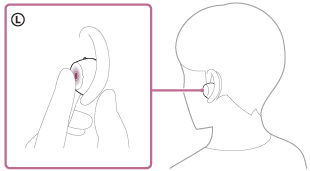
To deactivate the Quick Attention Mode
Release your finger from the touch sensor.
Note
- Depending on the ambient conditions and the type/volume of audio playback, ambient sounds may not be heard even when using the Quick Attention Mode. Do not use the headset in places where it would be dangerous if you are unable to hear ambient sounds, such as on a road with car and bicycle traffic.
- If the headset is not being worn properly in your ears, the Quick Attention Mode may not work correctly. Twist the headset to put it into your ears properly.
- Depending on the size of the earbud tips you use, the Quick Attention Mode may not be fully effective. Choose the size that allows you to hear the least ambient sounds.