


Connecting to a paired iPhone
-
Unlock the screen of the iPhone if it is locked.
-
Remove the headset units from the charging case.
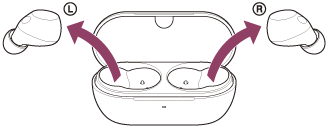
The headset turns on automatically.
-
Put the headset units into your ears.
When the headset has automatically connected to the last connected device, you will hear a notification sound indicating that the connection is established from both headset units at the same time. When you are wearing only one headset unit, you will hear the notification sound from the headset unit you are wearing.
Check the connection status on the iPhone. If it is not connected, proceed to step 4.
-
On your iPhone screen, go to [Settings] and touch [Bluetooth].
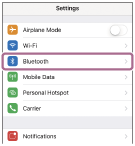
-
Touch the switch to turn on the Bluetooth function.
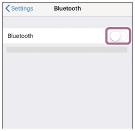
-
Touch [WF-C710N].
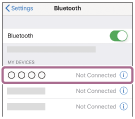
You will hear a notification sound indicating that the connection is established from both headset units at the same time. When you are wearing only one headset unit, you will hear the notification sound from the headset unit you are wearing.
Hint
- The above operating procedure is an example. For more details, refer to the operating instructions supplied with the iPhone.
Note
- If the last-connected Bluetooth device is placed near the headset, the headset may connect automatically to the device by simply turning on the headset. If this is the case, deactivate the Bluetooth function on the last-connected device or turn off the power.
- If you cannot connect your iPhone to the headset, delete the headset pairing information on your iPhone. Then, pair them again. For the operating procedures on your iPhone, refer to the operating instructions supplied with the iPhone.