


Listening to ambient sound during music playback (Ambient Sound Mode)
The microphones built into the left and right headset units make it easier to hear ambient sound. You can hear ambient sound while enjoying music.
To activate Ambient Sound Mode
Tap the touch sensor on the left headset unit while the noise canceling function is on.
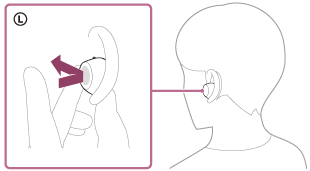
To change the setting of Ambient Sound Mode
You can change the settings of Ambient Sound Mode of the headset with the “Sound Connect” app.
Voice focus: Unwanted noise will be suppressed while announcements or people’s voices are picked up, allowing you to hear them as you listen to music.
To disable Ambient Sound Mode
Tap the touch sensor on the left headset unit to disable Ambient Sound Mode.
Each time you tap, the function switches as follows.
The noise canceling function is enabled and Ambient Sound Mode is disabled.
You will hear a notification sound from both headset units at the same time. When you are wearing only the left headset unit, you will hear the notification sound from the left headset unit.

Ambient Sound Mode is enabled and the noise canceling function is disabled.
You will hear a notification sound from both headset units at the same time. When you are wearing only the left headset unit, you will hear the notification sound from the left headset unit.
Check the notification sound
It may not play on any browsers except the latest ones.
- When Ambient Sound Mode is enabled
- When the noise canceling function is enabled
About the instruction manual video
Watch the video for how to use Ambient Sound Mode.
No audio explanation is available.
Models for countries and regions excluding Chinese mainland:
https://rd1.sony.net/help/mdr/mov0093/h_zz/
Models for Chinese mainland:
https://rd1.sony.net/help/mdr/mov0093/zh-cn/
Hint
- Ambient Sound Mode settings changed with the “Sound Connect” app are stored in the headset. You can enjoy music with the stored settings by enabling Ambient Sound Mode even when the headset is connected to other devices which do not have the “Sound Connect” app installed.
-
The “Sound Connect” app allows you to set a combination of the following three modes. If you select multiple modes, you can switch between them sequentially by tapping the touch sensor on the left side.
- Noise canceling function enabled
- Ambient Sound Mode enabled
- Noise canceling function and Ambient Sound Mode disabled
Note
- Depending on the ambient conditions and the type/volume of audio playback, ambient sounds may not be heard even when using Ambient Sound Mode. Do not use the headset in places where it would be dangerous if you are unable to hear ambient sounds, such as on a road with car and bicycle traffic.
- Depending on the surrounding environment, wind noise may increase when Ambient Sound Mode is enabled. In this case, set Ambient Sound Mode to disable.
- If the headset is not being worn properly in your ears, Ambient Sound Mode may not work correctly. Twist the headset to put it into your ears properly.
-
Do not pinch or cover the parts of the headset near the microphones on the left and right headset units with your hands. Functions such as the noise canceling function or Ambient Sound Mode may not work properly or the headset unit may make a beeping sound (feedback). If this happens, remove your hand or any other object from the left or right microphone area.
If a beeping sound (feedback) can be heard when using Ambient Sound Mode, lower the ambient sound volume in [Ambient Sound Control] on the “Sound Connect” app.
-
This headset is equipped with the function to detect a beeping sound (feedback) and cancel the sound in a short time.
In rare cases, the noise canceling function or Ambient Sound Mode may temporarily stop in reaction to a high note such as an alarm or an electronic sound. The noise canceling function or Ambient Sound Mode will automatically return in about a second. - If Ambient Sound Mode is enabled in a rather noisy environment, noise may be heard. This is not a malfunction. In this case, either enable the noise canceling function, or disable both the noise canceling function and Ambient Sound Mode.