


Using only one headset unit
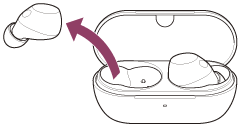
You can remove one headset unit from the charging case and use the headset unit by itself.
In this case, only the headset unit that has been removed from the charging case will turn on.
When you put on the other headset unit
The connection is automatically established between the left and right headset units, and you will hear the music or other audio on both headset units.
Assigning functions to the touch sensors
Depending on the headset unit you are wearing, some functions may not be available in the factory settings. In this case, you can change the function assignments to the touch sensors using the “Sound Connect” app.
Hint
-
In the factory settings, the music playback function is assigned to the right headset unit.
If only the right headset unit is worn in your ear, tap the touch sensor on the right headset unit to play music.
If only the left headset unit is worn in your ear, operate the connected device to play music. - When you listen with only one headset unit, you will hear a monaural sound with the left and right channels mixed.
- You can also talk hands-free even when you are wearing only one headset unit. When you receive an incoming call, answer the call using the headset unit you are wearing. If you put the other headset unit into the other ear while you are talking with only one headset unit, you can talk with both headset units.
Note
- When you are using only one headset unit, be sure to set the other headset unit into the charging case.
- When you are using only one headset unit, the remaining battery charge of the headset may be different on the left and right units.