


Using the noise canceling function
If you use the noise canceling function, you can enjoy music without being disturbed by ambient noise.
-
Remove the headset units from the charging case.
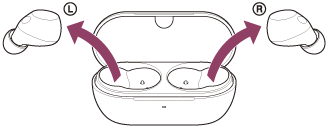
The headset turns on automatically.
When you use the headset for the first time after purchase or just after initializing the headset, the noise canceling function is enabled automatically when the headset is turned on. Any changes made to the settings are retained from this point on.
-
Put the headset units into your ears.
-
Tap the touch sensor on the left headset unit to change the settings of the noise canceling function.
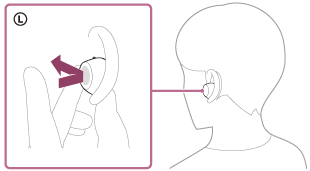
Each time you tap, the function switches as follows.
Ambient Sound Mode is enabled and the noise canceling function is disabled.
You will hear a notification sound from both headset units at the same time. When you are wearing only the left headset unit, you will hear the notification sound from the left headset unit.

The noise canceling function is enabled and Ambient Sound Mode is disabled.
You will hear a notification sound from both headset units at the same time. When you are wearing only the left headset unit, you will hear the notification sound from the left headset unit.
Check the notification sound
It may not play on any browsers except the latest ones.
- When Ambient Sound Mode is enabled
- When the noise canceling function is enabled
About the instruction manual video
Watch the video for how to use the noise canceling function.
No audio explanation is available.
Models for countries and regions excluding Chinese mainland:
https://rd1.sony.net/help/mdr/mov0093/h_zz/
Models for Chinese mainland:
Hint
- You can also enable or disable the noise canceling function, and change the settings of the noise canceling function and Ambient Sound Mode with the “Sound Connect” app.
-
The “Sound Connect” app allows you to set a combination of the following three modes. If you select multiple modes, you can switch between them sequentially by tapping the touch sensor on the left side.
- Noise canceling function enabled
- Ambient Sound Mode enabled
- Noise canceling function and Ambient Sound Mode disabled
- When only one headset unit is worn, Ambient Sound Mode is enabled, even if the headset was set to the noise canceling function when you used the headset last. Putting on both headset units will enable the noise canceling function.
Note
- The headset cannot fully perform the noise canceling function unless the supplied earbud tips are used.
- If the headset is not being worn properly in your ears, the noise canceling function may not work correctly. Twist the headset to put it into your ears properly.
- Do not pinch or cover the parts of the headset near the microphones on the left and right headset units with your hands. Functions such as the noise canceling function or Ambient Sound Mode may not work properly or the headset unit may make a beeping sound (feedback). If this happens, remove your hand or any other object from the left or right microphone area.