


Turning on the headset
When the headset is stored in the charging case
-
Remove the headset units from the charging case.
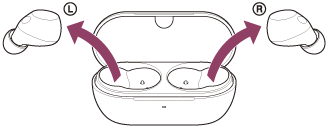
The headset turns on automatically. The connection between the left and right units is established.
When you remove only one headset unit from the charging case, only the removed unit turns on.
When the headset is not stored in the charging case
When the headset is not being worn in your ears for about 15 minutes after being removed from the charging case, the headset turns off automatically. In this case, turn the headset on by tapping the touch sensor of the headset or by putting the headset into your ears. The headset units will also turn on when they are set in the charging case and then removed from the charging case.
You can use the “Sound Connect” app to change the setting of the headset so that it will not be turned off automatically.
When the headset is turned on
When turning on the headset for the first time after purchase or just after initializing the headset, the headset goes into Bluetooth pairing mode.
When you use the headset for the first time after purchase or just after initializing the headset, the noise canceling function is turned on automatically when you put the headset units into your ears.
If the noise canceling settings were changed previously, the settings are retained.
If you tap the touch sensor when the headset is not connected via a Bluetooth connection, you will hear a notification sound indicating that the headset is turned on.