


Location and function of parts
Left unit
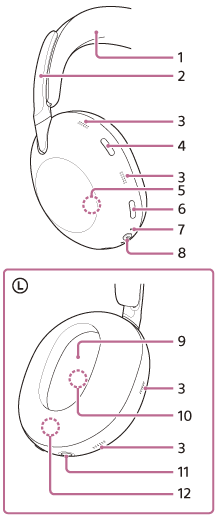
-
Headband
-
Headband sliders
Slide to adjust the length of the headband.
-
Noise canceling function microphones (external) and voice pickup microphones
Pick up the sound of noise when the noise canceling function is in use and the wearer’s voice during a phone call or when the Speak-to-Chat mode is in use.
-
Listening mode button
-
Built-in antenna
A Bluetooth antenna is built into the headset.
-
Noise canceling/Ambient Sound Mode button
-
Indicator (orange/blue)
Lights up in orange or blue to indicate the battery or communications status of the headset.
-
Power button/Bluetooth button
 : Power mark
 : Bluetooth mark
 -
 (left) mark
 -
Noise canceling function microphones (internal)
Picks up the sound of the noise when the noise canceling function is in use.
-
Headphone cable input jack
Connect a music player or other device with the supplied headphone cable. Make sure that you insert the cable until it clicks. If the plug is not connected correctly, you may not hear the sound properly.
-
Serial number
Located inside the unit.
See “To check the serial number" below.
Right unit
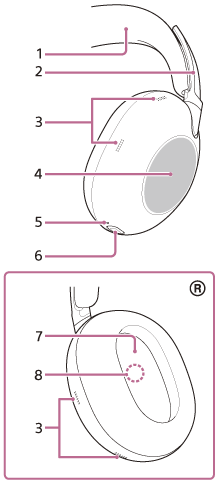
-
Headband
-
Headband sliders
Slide to adjust the length of the headband.
-
Noise canceling function microphones (external) and voice pickup microphones
Pick up the sound of noise when the noise canceling function is in use and the wearer’s voice during a phone call or when the Speak-to-Chat mode is in use.
-
Touch sensor control panel
Use the touch sensor control panel to remotely control music playback on a connected Bluetooth device and perform other actions.
-
Charging indicator (orange)
Lights up in orange while charging.
-
USB Type-C port
Connect the headset to an AC outlet with a USB AC adaptor or to a computer with a USB Type-C cable to charge the headset.
-
 (right) mark
 -
Noise canceling function microphones (internal)
Picks up the sound of the noise when the noise canceling function is in use.
To check the serial number
- Make sure the headset is turned off and the USB Type-C cable is not connected.
- Remove the earpad from the left unit by pulling it straight off the housing. Avoid pulling it off at an angle.
The serial number is located on the lower center of the left unit.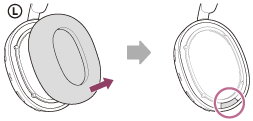
- Attach the removed earpad to the left unit.
Make sure that the direction of the two protrusions on the unit and the holes in the earpad are aligned, and firmly insert the six tabs into the unit until you hear a click.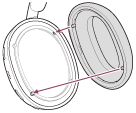
Note
- Do not remove the earpad unless necessary.
- Before removing the earpad, make sure the headset is turned off and the USB Type-C cable is not connected.
- Do not remove earpad in the presence of iron sand or other metal objects. Iron sand or other metal objects may adhere to the magnet inside the headset, causing the headset to malfunction.
- Be sure to attach the earpad in the correct direction. If the earpad is not attached in the correct direction, you may not get the desired acoustic performance.
- Any defects caused by failure to follow the above precautions are not covered by the product warranty.