


Pairing and connecting with an Android smartphone
The operating procedure to register the device that you wish to connect to is called “pairing”. First, pair a device to use it with the headset for the first time.
Before starting the operating procedure, check the following.
- The Android smartphone is placed within 1 m (3.2 ft) of the headset.
- The headset is charged sufficiently.
- The operating instructions for the Android smartphone are in hand.
-
Check the status of the headset.
The headset enters pairing mode automatically in the following cases. Proceed to step 2.
- When you pair the headset with a device for the first time after purchasing the headset
- After initializing the headset and clearing all pairing information
When you pair a second or subsequent device, if the headset already has pairing information for other devices, enter pairing mode manually. Press and hold the Bluetooth button (A) for about 5 seconds or more.
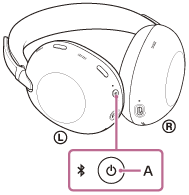
The indicator repeatedly flashes in blue twice in a row. You will hear the voice guidance say, “Pairing”.
-
Unlock the screen of the Android smartphone if it is locked.
-
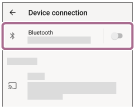
On your Android smartphone screen, select the following items.
[Settings] - [Device connection] - [Bluetooth]
-
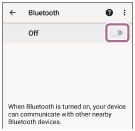
Touch the switch to turn on the Bluetooth function.
-
Touch [1000X THE COLLEXION].
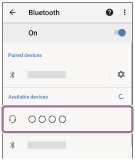
If Passkey (*) input is required, input “0000”.
The headset and smartphone are paired and connected with each other.
You will hear a notification sound indicating that the connection is established.
If they are not connected, see “Connecting to a paired Android smartphone”.
If [1000X THE COLLEXION] does not appear on your Android smartphone screen, try again from step 3.
(*) A Passkey may be called “Passcode”, “PIN code”, “PIN number”, or “Password”.
Hint
- The above operating procedure is an example. For more details, refer to the operating instructions supplied with the Android smartphone.
- To delete all Bluetooth pairing information, see “Initializing the headset to restore factory settings”.
Note
- If pairing is not established within 5 minutes, pairing mode is canceled. In this case, turn off the power and start the operating procedure again from step 1.
- Once Bluetooth devices are paired, there is no need to pair them again, except in the following cases:
- If pairing information is deleted, such as after a repair
- When a 9th device is paired
The headset can be paired with up to 8 devices. If you pair a 9th device, the pairing information with the oldest connection date and time will be overwritten with the information for the new device. - When the pairing information for the headset has been deleted from the connected Bluetooth device
- When the headset is initialized
All of the pairing information will be deleted. In this case, delete the pairing information for the headset from the connected device and then pair them again.
- The headset can be paired with multiple devices, but can only play music from 1 paired device at a time.