Wireless Noise Canceling Stereo Headset
1000X THE COLLEXION
Help Guide
Table of Contents
Top
What you can do with the headset
Using the headset
Using the
“Sound Connect”
app
Getting started
About the voice guidance
Supplied accessories
Included items
Setting the headset in the carrying case
Parts and controls
Location and function of parts
About the indicator
Wearing the headset
Wearing the headset
Operating the headset
About the touch sensor control panel
Power/Charging
Charging
Available operating time
Checking the remaining battery charge
Turning on the headset
Turning off the headset
Making connections
How to make a wireless connection to Bluetooth devices
Easy setup with app
Connecting with the
“Sound Connect”
app
Android smartphone
Pairing and connecting with an Android smartphone
Connecting to a paired Android smartphone
Switching between
Classic Audio
and LE Audio connections with an Android smartphone
iPhone (iOS devices)
Pairing and connecting with an iPhone
Connecting to a paired iPhone
Computers
Pairing and connecting with a computer (Windows® 11)
Pairing and connecting with a computer (Mac)
Connecting to a paired computer (Windows 11)
Connecting to a paired computer (Mac)
Other Bluetooth devices
Pairing and connecting with a Bluetooth device
Connecting to a paired Bluetooth device
Multipoint connection
Connecting the headset to 2 devices simultaneously (multipoint connection)
Switching audio between multiple devices with “
audio switch
”
Sharing music with “Auracast™ broadcast audio”
Disconnecting Bluetooth connection (after use)
Using the supplied headphone cable
Listening to music
Listening to music via a Bluetooth connection
Listening to music from a device via a Bluetooth connection
Controlling the audio device (Bluetooth connection)
Switching sound settings according to the content or usage scenario (listening mode)
About
360 Reality Audio
Enjoying seamless playback with speakers (
Auto Switch
)
Noise canceling function
What is noise canceling?
Using the noise canceling function
Always automatically optimizing the noise canceling performance to suit the wearer and usage environment
Listening to ambient sound
Listening to ambient sound during music playback (Ambient Sound Mode)
Listening to ambient sound quickly (Quick Attention Mode)
Speaking with someone while wearing the headset (
Speak-to-Chat
)
Making phone calls
Receiving a call
Making a call
Functions for a phone call
Making a video call on your computer
Using the voice assist function
Using
Google™ Gemini
Using
Tencent Xiaowei
Using the voice assist function (
Google app
)
Using the voice assist function (Siri)
Important information
Precautions
Supported codecs
How to keep the software up-to-date (for comfortable use of the headset)
To prevent burning or malfunction due to getting wet
Licenses
Trademarks
Troubleshooting
Troubleshooting
Resetting the headset
Initializing the headset to restore factory settings
Specifications
Specifications
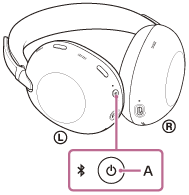
Turning on the headset
Press and hold the power button (A) for about 2 seconds or more until the indicator flashes in blue.
Print This Page
Previous
Next
TP1002085400