


Switching sound settings according to the content or usage scenario (listening mode)
When the headset is connected via Bluetooth, you can enjoy music in a listening mode suited to the playback content or usage scenario. Listening modes can be switched easily using the headset controls.
- Turn on the headset.
You will hear a notification sound indicating that the headset is turned on.
- Press the listening mode button to switch to your preferred listening mode.
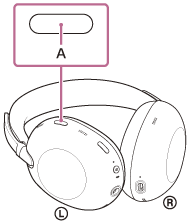
Each time the button is pressed, the settings switch as follows.
You will hear a voice guidance and notification sound each time the setting is changed.
- Standard
- Music
- Cinema
- Game
- Background Music
Hint
- At the time of purchase, only “Standard,” “Music,” and “Cinema” can be switched using the listening mode button. Setting on the “Sound Connect” app is required for other listening modes.
- You can also switch the listening modes using the “Sound Connect” app.
Note
- The listening mode setting is disabled in the following cases.
- During call
- When using a headset with a headphone cable connected
- The listening mode setting is maintained even after the headset is turned off. When the headset is turned on, you can enjoy the sound with the same setting.
TP1002271849