


Making a call
You can talk on the phone hands-free via a Bluetooth connection on a smartphone that supports the following Bluetooth profiles.
- HFP: Hands-free Profile
- HSP: Headset Profile
- If your smartphone supports both HFP and HSP, set it to HFP.
- The operating procedure may vary depending on the smartphone. Refer to the operating instructions supplied with the smartphone.
- Depending on the connected device or the application, the functions may not work properly even if you try to operate them with the headset.
-
Connect the headset to a smartphone via a Bluetooth connection.
-
Operate your smartphone to make a call.
When you make a call, the dial tone is heard from the headset.
If you make a call during music playback, playback pauses.
If no dial tone is heard via the headset, switch the call device to the headset using your smartphone.
-
Adjust the volume using the touch sensor control panel.
- To increase the volume:
Swipe up repeatedly until the volume reaches the desired level.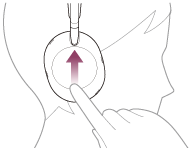
- To lower the volume:
Swipe down repeatedly until the volume reaches the desired level.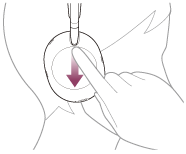
- To change the volume continuously:
Swipe up or down and hold. Release at the desired volume level.
When the volume reaches the maximum or minimum, an alarm sounds.
- To increase the volume:
-
When you finish your phone call, tap the touch sensor control panel twice quickly with an interval of about 0.4 seconds to end the call.
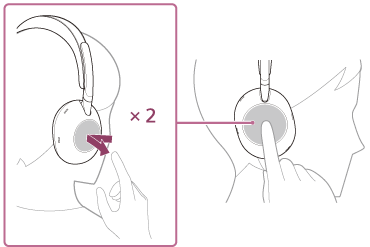
If you made a call during music playback, music playback resumes automatically after ending the call.
Hint
- The volume for a call can be adjusted during a telephone conversation only.
- The headset volume during a call and during music playback can be independently adjusted. Even if you change the volume during a call, the volume of music playback does not change.
Note
- Depending on the connected device or playback application, when you make a call during music playback, playback may not resume automatically even after you finish the call.
- Use a smartphone at least 50 cm (19.68 in) away from the headset. Noise may result if the smartphone is too close to the headset.
- In order to make it easier for you to hear your own voice during a phone call, the microphones work to capture ambient sounds (Sidetone function). If your voice is too loud or the sounds of your surroundings are bothering you, you can change the setting with the “Sound Connect” app. Turn off [Capture Voice During a Phone Call].
TP1002085387