


Initializing the headset to restore factory settings
If the headset does not operate correctly even after resetting, initialize the headset.
-
Turn off the headset.
Remove the USB Type-C cable.
-
Press and hold the power button (A) and the noise canceling/Ambient Sound Mode button (B) for about 10 seconds.
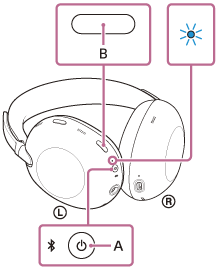
When initializing is complete, the indicator flashes in blue 4 times.
This operating procedure resets the volume settings and other settings to the factory settings and deletes all pairing information. In this case, delete the pairing information for the headset from the connected device and then pair them again.
If the headset does not operate correctly even after initializing, consult your nearest Sony dealer.
TP1002091900