


Using the noise canceling function
If you use the noise canceling function, you can enjoy music without being disturbed by ambient noise.
-
Turn on the headset.
You will hear a notification sound indicating that the headset is turned on.
When you are using the headset for the first time after purchase or just after initializing the headset, the noise canceling function is activated automatically when you turn on the headset. Any changes made to the settings are retained from this point on.
-
Press the noise canceling/Ambient Sound Mode button (A) to change the settings of the noise canceling function.
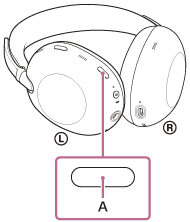
Each time the button is pressed, the function switches as follows.
Ambient Sound Mode is enabled and the noise canceling function is disabled.
You will hear a notification sound.

The noise canceling function is enabled and Ambient Sound Mode is disabled.
You will hear a notification sound.
Check the notification sound
It may not play on any browsers except the latest ones.
- When Ambient Sound Mode is enabled
- When the noise canceling function is enabled
About the instruction manual video
Watch the video for how to use the noise canceling function. No audio explanation is available.
Models for countries and regions excluding Chinese mainland and Japan:
https://rd1.sony.net/help/mdr/mov0107/h_zz/
Models for Chinese mainland:
https://rd1.sony.net/help/mdr/mov0107/zh-cn/
Models for Japan:
Hint
- If you connect the supplied headphone cable while using the noise canceling function with a Bluetooth connection, the Bluetooth function is turned off. You can continue to use the noise canceling function.
- You can also change the settings of the noise canceling function and Ambient Sound Mode with the “Sound Connect” app.
-
You can select one of the following on the “Sound Connect” app to set how you want the functions to change when you press the noise canceling/Ambient Sound Mode button.
- Noise canceling function enabled
- Ambient Sound Mode enabled
- Noise canceling function and Ambient Sound Mode disabled