


Attaching/removing the lens hood
We recommend that you use the lens hood to prevent light outside the shooting frame from affecting the image.
-
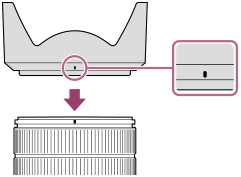
Align the red line on the lens hood with the red line on the lens (lens hood index), and then insert the lens hood into the lens mount.
-
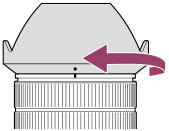
Rotate the lens hood in the direction of the arrow until the red dot on the lens hood aligns with the red line on the lens and the lens hood clicks into place.
To remove the lens hood
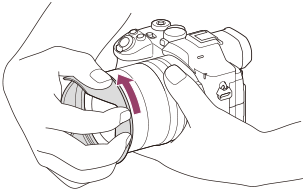
Hold and secure the lens barrel with one hand. With the other hand, hold the lens hood so that your hand covers it entirely and turn it in the direction of the arrow.
- If force is applied to the front edge of the lens hood, such as by pinching the tip, the hood may become deformed and difficult to remove.
Note
- Attach the lens hood properly. Otherwise, the lens hood may not have any effect or may be partially reflected in the image.
- Remove the lens hood when using the flash as the lens hood blocks the flash light and may appear as a shadow on the image.
- To store the lens hood after shooting, attach the lens hood to the lens backward.
TP1002194979