


List of icons on the screen for shooting still images
The icons displayed when the camera is held horizontally are explained. The displayed contents and their positions in the illustrations are just guidelines, and may differ from the actual displays.
- The icon display positions may differ when the camera is held vertically. For the information display when the camera is held vertically, refer to “ Vertical Display .”
- The displayed contents may vary depending on your camera’s system software (firmware) version.
Monitor mode
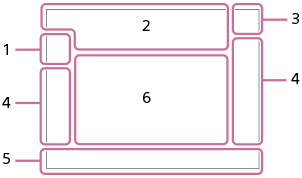
Viewfinder mode
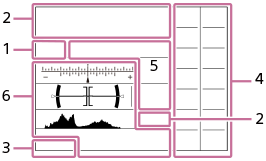
Hint
- In addition to the icons described on this page, there are more icons for touch operations (touch function icons) that are displayed on the left or right side of the screen when you swipe the monitor. For details, refer to “Touch function icons.”
-
Shooting mode/Scene recognition
-


- Shooting mode
-


- Shooting mode (Scene Selection)
-

- Shooting mode (Registered shooting settings)
-


- Scene Recognition icons
-
- Camera settings
-

- A memory card is inserted
- NO CARD
- No memory card inserted
-


- Nearing the rewriting upper limit of the memory card / Rewriting upper limit of the memory card reached
- 100
- Remaining number of recordable images
-

- Writing data / Number of images left to write
- 20M / 18M / 17M / 13M / 10M / 8.9M / 8.4M / 6.6M / 5.0M / 4.4M / 4.2M / 3.3M
- Image size of still images
-


- RAW recording (compressed/lossless compression)
- J-X.FINE J-FINE J-STD J-LIGHT H-X.FINE H-FINE H-STD H-LIGHT
- JPEG Quality / HEIF Quality
- 4:2:2
- Color sampling for HEIF
-


- Focus Mode
-

- Flash charging in progress
-

- Setting Effect OFF
-

- Exposure Effect (Exposure Setting Only)
-


- SteadyShot off/on, Camera shake warning
-


- Smart Zoom/Clear Image Zoom/Digital Zoom
-


- Remote Shooting (connected) / Remote Shooting (connection error)
-

- Bright Monitoring
-

- Remote control
-


- Connected to the cloud/Communicating with the cloud/Cloud connection error
-


- Transferring to smartphone / Transfer error
-


- Connected to Wi-Fi (via a Wi-Fi access point)
-

- Disconnected from Wi-Fi (via a Wi-Fi access point)
-


- Connected to Wi-Fi/Disconnected from Wi-Fi (Wi-Fi Direct)
-


- Connected to LAN/Disconnected from LAN (When using a USB-LAN conversion adaptor)
-

- Writing copyright information [On]
-

- Focus Cancel
-


- Touch Focus+AE cancel/TouchTracking+AE cancel/Touch AE cancel
-

- Tracking Cancel
-


- Bluetooth connection available / Bluetooth connection unavailable
-


- Obtaining location information / Location information cannot be obtained
-

- Airplane Mode
-

- Overheating warning
-


- Database file full / Database file error
-


- AE lock/FEL lock/AWB lock
-


- Gamma Disp. Assist Typ.
-
- Battery
-

- Remaining battery
-

- Remaining battery warning
-

- USB power supply
-
- Shooting settings
-


- Drive Mode
-

- Continuous shooting speed boost setting
-


- Flash Mode / Wireless Flash / Red Eye Reduction
-
 ±0.0
±0.0 - Flash Comp.
-
- Focus Mode
-


- Focus Area
-


- Metering Mode
-


 7500K A5 G5
 - White Balance (Auto, Preset, Underwater Auto, Custom, Color temperature, Color filter)
-


-
 D-Range Optimizer
-


-
Creative Look
-


-
Subject Recog in AF/
Recognition Target
-


- Shutter Type
-
 –
– 

-
Picture Profile
-


-
 Finder Frame Rate
-


- Aspect ratio
-
- Focus indicator/exposure settings
-


- Focus indicator
- 1/250
- Shutter speed
- F3.5
- Aperture value
-


- Exposure compensation/Metered Manual
- ±0.0
- Flash Comp.
- ISO400 ISO AUTO
- ISO sensitivity
-
- AE lock/FEL lock/AWB lock
-
- Guides/other
-
Tracking Cancel
- Guide display for tracking
-
Focus Cancel
- Guide display for canceling focusing
-
Tracking+AE Cancel
- Guide display for tracking+AE
-
Focus+AE Cancel
- Guide display for focus+AE
-
Touch AE Cancel
- Guide display for touch AE
-

- Guide display for dials

Bracket indicator- C:32:00
- Self-diagnosis display
-

- Spot metering area
-

- Histogram
-

- Digital level gauge
-
- Smart Zoom/Clear Image Zoom/Digital Zoom
-


- Focus range limiter
-

- Ext. Flash AF Illuminator
-
TP1002206882