


Manual Focus

When it is difficult to focus properly in the autofocus mode, you can adjust the focus manually.
-
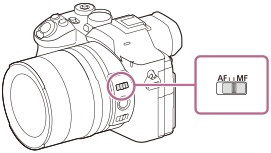
Set the focus mode switch to MF.
- Rotate the front lens ring to achieve sharp focus.
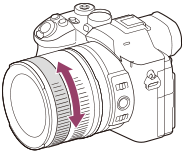
- When you rotate the front lens ring, the focus distance is displayed on the screen.
Hint
- Even if the focus mode switch is set to AF, you can use manual focus by selecting [Manual Focus] in MENU →
 (Focus) → [AF/MF] → [
 Focus Mode].
 - You can assign the focus function to the rear lens ring by selecting MENU →
 (Setup) → [Operation Customize] → [Lens Ring Setup].
Note
- When you use the viewfinder, adjust the diopter level to obtain the correct focus on the viewfinder.
- If you re-select the focus mode, any focus distance that you set manually will be canceled.
- The displayed focus distance is just a reference.
TP1002162650