


Selecting the focus method (Focus Mode)

Selects the focus method to suit the movement of the subject.
-
Set the focus mode switch to AF.
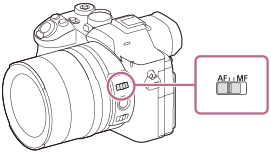
-
MENU →
 (Focus) → [AF/MF] → [
 Focus Mode] → desired setting.
Menu item details
-
 Single-shot AF:
 - The product locks the focus once focusing is complete. Use this when the subject is motionless.
-
-
 Continuous AF:
 - The product continues to focus while the shutter button is pressed and held halfway down. Use this when the subject is in motion. In [Continuous AF] mode, there is no beep when the camera focuses.
-
-
 DMF:
DMF: - You can make fine adjustments manually after performing auto focusing, letting you focus on a subject more quickly than when using [Manual Focus] from the beginning. This is convenient in situations such as macro shooting.
-
-
 Manual Focus:
 - Adjusts the focus manually. If you cannot focus on the intended subject using auto focus, use [Manual Focus].
Focus Mode Switch
When the focus mode switch is set to “MF,” you can switch directly to the [Manual Focus] mode without operating the menu.
- When the focus mode switch is set to “AF,” you can configure all [Focus Mode] settings, including [Manual Focus].
Focus indicator
 (lit):
The subject is in focus and the focus is locked.
(flashing):
The subject is not in focus.
 (lit):
The subject is in focus. The focus will be adjusted continuously according to the movements of the subject.
 (lit):
Focusing is in progress.
Subjects on which it is difficult to focus using auto focus
- Dark and distant subjects
- Subjects with poor contrast
- Subjects seen through glass
- Fast-moving subjects
- Reflective light or shiny surfaces
- Flashing light
- Back-lit subjects
- Continuously repetitive patterns, such as the facades of buildings
- Subjects in the focusing area with different focal distances
Hint
- When the focus mode is set to [Continuous AF], you can zoom using a lens ring with a zoom function assigned. You can adjust the angle of view while continuing autofocus.
- In [Continuous AF] mode, you can lock the focus by pressing and holding the focus hold button.
- When the focus range limiter switch is set to “∞-3m,” the camera focuses on subjects more than 3 m (9.84 ft.) away in telephoto shooting (shooting with a 35 mm-equivalent focal length of 150 mm or longer). This function allows the camera to focus more quickly on distant subjects by keeping it from focusing on subjects at close distances in telephoto shooting.
- When you set the focus to infinity in [Manual Focus] mode or [DMF] mode, make sure that the focus is on a sufficiently distant subject by checking the monitor or the viewfinder.
Note
- When [Continuous AF] is set, the angle of view may change little by little while focusing.
- Only [Continuous AF] and [Manual Focus] are available when shooting movies or when the Still/Movie/S&Q dial is set to
 (Movie) or S&Q (S&Q Motion).
TP1002194934