


Anti-flicker Set.

To reduce the impact of flickering from artificial light sources (such as fluorescent or LED light), you can set the shutter speed more finely than usual.
This function reduces differences in exposure and color tone between the upper and lower area of an image during continuous shooting under artificial light sources.
-
MENU →
 (Shooting) → [Shutter] → [Anti-flicker Set.] → desired setting item.
Menu item details
-
 Var. Shutter:
 - Reduces the differences in brightness between each image by finely adjusting the shutter speed according to the flickering frequency. ([On]/[Off])
[Var. Shutter] can only be selected when the camera is in an exposure mode that allows you to manually adjust the shutter speed (both still images and movies). -
When [
Var. Shutter] is set to [On], the shutter-speed denominator is displayed in the decimal format (high-resolution shutter speed).
For example, if the normal shutter speed is set to 1/250 second, the value will be displayed as 250.6. (The numbers may differ from the actual ones.)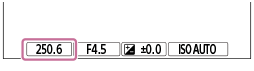
- Set [Var. Shutter] to [Off] to return to the original display.
- Set [
-
Var. Shutter Set.:
- Sets the shutter speed when [Var. Shutter] is set to [On].
Select a shutter speed that reduces the impact of flickering while checking the monitor. The faster you set the shutter speed, the more likely there is to be a difference between the monitor display before shooting and the recorded image. Make sure that the impact of flickering is reduced in the recorded image.
Effects of flicker depending on the shutter type
Depending on the shutter type, flicker may affect the captured images as follows.
When [Shutter Type] is set to [Mechanical Shutter]:
There is no difference in exposure or color between the upper and lower area of an image. However, differences in exposure or color may occur during continuous shooting.
When [Shutter Type] is set to [Electronic Shutter]:
Differences in exposure or color may occur between the upper and lower area of an image.
Monitor display before shooting

Image captured with [Mechanical Shutter] selected
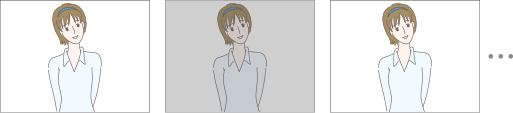
Image captured with [Electronic Shutter] selected

Hint
- When [Var. Shutter Select] is assigned to a custom key, you can switch the [Var. Shutter] function on and off by pressing the key.
- On the [Var. Shutter Set.] screen, you can finely adjust the high-resolution shutter speed using the control dial L or control dial R as in the following example.
250.6 → 253.3 → 256.0 → 258.8*
You can change the high-resolution shutter speed to an integral multiple value using the control wheel, as in the following example.
125.3 (2 times) ← 250.6 → 501.3 (1/2 times) *
*The numbers may differ from the actual ones.
- When [Var. Shutter] is set to [On], the high-resolution shutter speed can be finely adjusted on the shooting standby screen. If you want to change the high-resolution shutter speed to an integral multiple value even on the shooting standby screen, assign [Shutter Speed(step)] to a custom key or the “My Dial” setting.
- When you change the [Var. Shutter] setting from [On] to [Off], the high-resolution shutter speed switches to the closest value among normal shutter speeds.
Note
- When [Var. Shutter] is set to [On], the release time lag may be longer.
- When [Var. Shutter] is set to [On], the continuous shooting speed may be slower.
- Even when [Var. Shutter] is set to [On], depending on the frequency of the light source, you may be unable to set the appropriate shutter speed and eliminate the impact of flickering. In that case, try the following.
When [Shutter Type] is set to [Mechanical Shutter]:- Setting a slower shutter speed
- Switching to another shutter type
- Setting the shooting mode to manual exposure and setting the aperture value (F-number) to a larger value
- Setting a slower shutter speed
- Switching to another shutter type
- When you press the shutter button halfway down, flickering may appear temporarily.
- High-resolution shutter speed setting values cannot be registered to [Reg. Custom Shoot Set]. The default shutter speed value will be applied instead.