


Aperture Priority
You can shoot by adjusting the aperture and changing the range in focus, or by defocusing the background.
The following explanations refer to operations when [Shooting Mode Dial] under [Mode Dial Control Set] is set to [Set with Dial].
-
Set the Still/Movie/S&Q dial to the desired shooting mode.
- If you select S&Q (slow-motion/quick-motion), you can select [S&Q Motion] or [
 Time-lapse] on the [Shoot Mode] screen.
- If you select S&Q (slow-motion/quick-motion), you can select [S&Q Motion] or [
-
Set the mode dial to A (Aperture Priority).
-
Select the desired value by rotating the aperture ring (A).
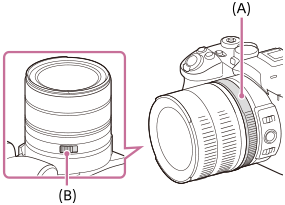
(A) Aperture Ring
(B) Aperture Click Switch
- Smaller F-value: The subject is in focus, but objects in front of and beyond the subject are blurred.
Larger F-value: The subject and its foreground and background are all in focus. - If the aperture value you have set is not suitable for appropriate exposure, the shutter speed on the shooting screen will blink. If this happens, change the aperture value.
- Smaller F-value: The subject is in focus, but objects in front of and beyond the subject are blurred.
-
Adjust the focus and shoot the subject.The shutter speed is automatically adjusted to obtain proper exposure.
About the aperture ring
The maximum aperture depends on the focal length of the lens. You cannot open the aperture wider than the maximum even if you set a smaller F-value using the aperture ring. You can confirm the correct F-value on the display panel of the monitor.
To set the shooting mode using MENU
When the mode dial is set to  (Disabled), you can set the shooting mode using menu operations.
MENU →  (Shooting) → [Shooting Mode] → [Shoot Mode] → Select [Aperture Priority].
Hint
- Smaller F-value (opening the aperture) narrows the range that is in focus. This allows you to put the subject in sharp focus and blur objects in front of and beyond the subject (depth of field becomes shallower). Larger F-value (narrowing down the aperture) widens the range that is in focus. This allows you to shoot the depth of the scenery (depth of field becomes deeper).
- You can change the click texture of the aperture ring using the Aperture Click Switch (B). When shooting still images, set the Aperture Click Switch to “ON,” and for movies, set it to “OFF.”
Note
- The brightness of the image on the screen may differ from the actual image being shot.
- We recommend that you set the aperture value to between F2.4 and F8 if you want to shoot images with high resolution.
TP1002186100