


Direct manual focus (DMF)

You can make fine adjustments manually after performing auto focusing, letting you focus on a subject more quickly than when using the manual focus from the beginning. This is convenient in situations such as macro shooting.
-
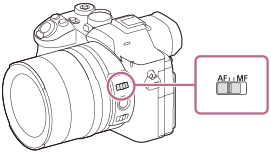
Set the focus mode switch to AF.
- MENU →
 (Focus) → [AF/MF] → [
 Focus Mode] → [DMF].
 - Press the shutter button halfway down to focus automatically.
- Keep the shutter button pressed halfway down, and then rotate the front lens ring to achieve a sharper focus.
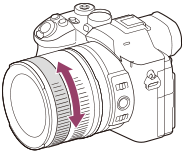
- When you rotate the front lens ring, the focus distance is displayed on the screen.
- To enable fine adjustments to the focus under various conditions, the focusing indicator can be moved beyond infinity. When you want to focus at infinity, do not move the indicator to the end of the bar. Instead, adjust the focus while checking the monitor, etc.
- Press the shutter button fully down to shoot an image.
Hint
- You can assign the focus function to the rear lens ring by selecting MENU →
 (Setup) → [Operation Customize] → [Lens Ring Setup].
TP1002162651