


Sides
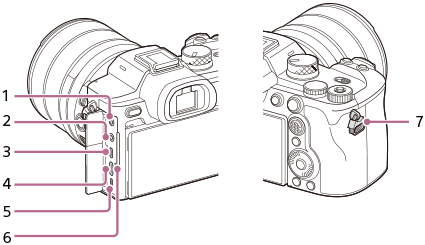
-
 (Microphone) jack
When an external microphone is connected, the built-in microphone turns off automatically. When the external microphone is a plugin-power type, the power of the microphone is supplied by the camera.
-
 (Headphones) jack
 - HDMI type D micro jack
- USB Type-C® terminal
- Multi/Micro USB Terminal*
This terminal supports Micro USB-compatible devices.
- Charge lamp
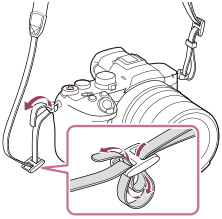
- Hooks for shoulder strap
Attach both ends of the strap onto the camera.
*For details on compatible accessories for the Multi/Micro USB Terminal, visit the Sony website, or consult your Sony dealer or local authorized Sony service facility.
Notes on USB terminals
You can use either the USB Type-C terminal or the Multi/Micro USB Terminal for USB communications. However, you cannot conduct USB communications with both terminals simultaneously. Use the USB Type-C terminal to supply power and charge the battery pack. This camera cannot be powered via the Multi/Micro USB terminal.
- You can use accessories for the Multi Terminal, such as a remote commander (sold separately), while supplying power or performing remote shooting using the USB Type-C terminal.
Notes on the terminal cover
Ensure that the terminal cover is closed before use.