


Changing the function of the dial temporarily (My Dial Settings)

You can assign the desired functions to the control dial L/control dial R and the control wheel, and register up to three combinations of settings as “My Dial” settings. You can quickly recall or switch registered “My Dial” settings by pressing the custom key you assigned in advance.
Registering functions to “My Dial”
Register the functions that you want to assign to the control dial L/control dial R and the control wheel as [My Dial 1] through [My Dial 3].
- MENU →
 (Setup) → [Dial Customize] → [My Dial Settings].
 - Select a dial or wheel for
 (My Dial 1), and press the center of the control wheel.
 -
Select the desired function to assign using the top/bottom/left/right sides of the control wheel, and then press the center of the control wheel.
- Select “--” (Not set) for a dial or wheel to which you do not want to assign any function.
-
After you select functions for all of the dials and the wheel in
(My Dial 1) by repeating Steps 2 and 3, select [OK].The settings for
(My Dial 1) will be registered.- If you want to register
 (My Dial 2) and
  (My Dial 3) as well, follow the same procedure as described above.
- If you want to register
Assigning a key to recall “My Dial”
Assign a custom key to recall the registered “My Dial” settings.
- MENU → (Setup) → [Operation Customize] → [
 Custom Key/Dial Set.] or [
 Custom Key/Dial Set.] → Select the key that you want to use to recall “My Dial.”
 - Select the number of the “My Dial” setting that you want to recall or the pattern for switching “My Dial.”
Menu item details
- My Dial 1 during Hold /My Dial 2 during Hold/My Dial 3 during Hold:
- While you hold down the key, the functions that you registered in [My Dial Settings] are assigned to the dial/wheel.
- My Dial 1→2→3 :
- Each time you press the key, the function changes in the following sequence: “Normal function → Function of My Dial 1 → Function of My Dial 2 → Function of My Dial 3 → Normal function.”
- Toggle My Dial 1 /Toggle My Dial 2/Toggle My Dial 3:
- The function registered using [My Dial Settings] is maintained even if you do not hold down the key. Press the key again to return to the normal function.
Shooting while switching “My Dial”
During shooting, you can recall “My Dial” using the custom key, and shoot as you change the shooting setting by turning the control dial L/control dial R/control wheel.
In the following example, the functions listed below are registered to "My Dial," and [My Dial 1→2→3] is assigned to the C1 (Custom 1) button.
| Operation part | My Dial 1 | My Dial 2 | My Dial 3 |
|---|---|---|---|
| Control dial L |
 Exposure Comp. Exposure Comp.
|
Creative Look
|
Move AF Frame : Std : Std
|
| Control dial R | Shutter Speed | W Balance (C Temp) |
Move AF Frame : Std : Std
|
| Control wheel |
ISO
|
White Balance
|
Not set |
-
Press the C1 (Custom1) button.
The functions registered to [My Dial 1] will be assigned to the control dial L/control dial R and the control wheel.
- The icons for the functions registered to [My Dial 1] are displayed in the lower part of the screen.
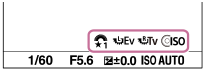
- Turn the control dial L to set the exposure compensation, turn the control dial R to set the shutter speed, and turn the control wheel to set the ISO value.
- Press the C1 button again.
The functions registered to [My Dial 2] will be assigned to the control dial L/control dial R and the control wheel.
- Turn the control dial L to set [Creative Look], turn the control dial R to set [W Balance (C Temp)], and turn the control wheel to set [White Balance].
- Press the C1 button again, and change the setting values for the functions registered to [My Dial 3].
Note
- “My Dial” settings in which every dial/wheel is set to [Not set] are not recalled when you press the custom key. They are also skipped in [My Dial 1→2→3].
- Even if a dial/wheel has been locked using the [Lock Operation Parts] function, it will be unlocked temporarily when “My Dial” is recalled.