


Still/Movie/S&Q dial and mode dial
You can use the Still/Movie/S&Q dial and mode dial to select a shooting mode according to the subject and purpose of shooting.
Still/Movie/S&Q dial
Use the Still/Movie/S&Q dial to select a shooting mode.
- Turn the Still/Movie/S&Q dial while pressing the lock release button on the front of the Still/Movie/S&Q dial.
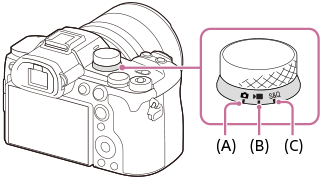
(A) Still image shooting mode
(B) Movie recording mode
(C) Slow-motion/quick-motion shooting mode
Hint
- The displayed menu items vary depending on the Still/Movie/S&Q dial position.
- When shooting a time-lapse movie, set the Still/Movie/S&Q dial to S&Q, and select [
 Time-lapse].
Mode dial
The exposure mode you select determines how the aperture (F value) and shutter speed are adjusted.
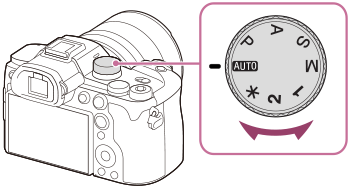
| Mode dial | Exposure mode | Description |
|---|---|---|
 (Auto) (Auto) |
Intelligent Auto /Scene Selection | The camera shoots with automatic scene recognition ( Intelligent Auto ). You can specify the shooting scene and shoot with the settings automatically set by the camera (Scene Selection). |
| P | Program Auto | Allows you to shoot with the exposure adjusted automatically (both the shutter speed and the aperture value). You can set shooting functions such as [ ISO] . ISO] . |
| A | Aperture Priority | The aperture value is given priority and the shutter speed is adjusted automatically. Select this when you want to blur the background or focus on the entire screen. |
| S | Shutter Priority | The shutter speed is given priority and the aperture value is adjusted automatically. Select this when you want to shoot a fast-moving subject without blurring, or when you want to shoot a water or light trail. |
| M | Manual Exposure | Manually adjust both the aperture value and shutter speed. You can shoot with your favorite exposure. |
| 1 / 2 | Recalling camera settings | You can call up frequently used modes and numerical value settings that have been registered* in advance then shoot the images.
*In [ |
 (Disabled) (Disabled) |
Selecting from the menu | You can select the exposure mode from the menu without using the mode dial. You can also recall shooting settings from MR1 to MR10 that you have registered in advance. |
 Camera Set. Memory]
Hint
- If you want to change the shooting mode without using the Still/Movie/S&Q dial or mode dial, you can change the shooting mode using menu operations by selecting [Set with Menu] for [Shooting Mode Dial] under [Mode Dial Control Set].
TP1002206065