


Basic icons displayed on the monitor
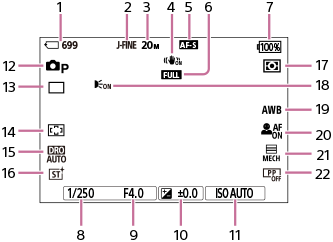
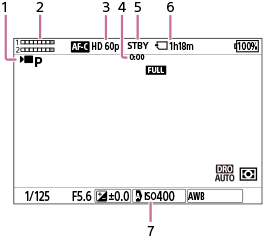
This section describes the screen display when the shooting mode is  (Program Auto).
- The following is an example of the display when the screen display is set to [Display All Info.] and the touch function icons are hidden.
- The displayed content and positions are for reference only, and may differ from the actual display. Some icons may not be displayed depending on the camera settings.
- For information on how to show/hide the touch function icons and examples of the touch function icon display, refer to “Touch function icons.”
During still image shooting
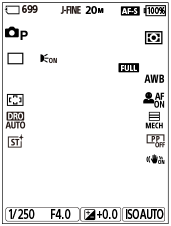
Display when holding the camera vertically
- Number of still images that can be recorded on the memory card
- [JPEG/HEIF Switch] is set to [JPEG]. [JPEG Quality] is set to [Fine].
- [JPEG Image Size] is set to [L: 20M].
- [
 SteadyShot] is set to [On].
 - The focus mode is set to [Single-shot AF].
- The focus range limiter switch is set to “FULL.”
- Remaining battery level
- Shutter speed
- Aperture value
- Exposure compensation
-
[
 ISO] is set to [ISO AUTO].
 - The shooting mode is set to [Program Auto].
- [Drive Mode] is set to [Single Shooting].
- [Focus Area] is set to [Wide].
- [D-Range Optimizer: Auto] is selected.
- [Creative Look] is set to [ST(Standard)].
-
[Metering Mode] is set to [Multi].
- Displayed when a flash with AF Illuminator functionality is attached to the camera, [Ext. Flash AF Illuminator] is set to [Auto], and the camera detects that the AF Illuminator is required.
- [White Balance] is set to [Auto].
-
[Subject Recog in AF] is set to [On] and [Recognition Target] is set to [Human].
- [Shutter Type] is set to [Mechanical Shutter].
- [Picture Profile] is set to [Off].
During movie recording
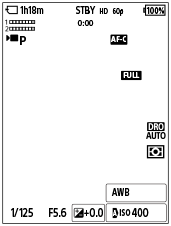
Display when holding the camera vertically
- The shooting mode is set to [Program Auto].
- Audio level
- [
 File Format] is set to [XAVC S HD] and [Rec Frame Rate] is set to [60p].
 - Actual shooting time of the movie
- The camera is in the shooting standby mode.
- Recordable movie time on the memory card
-
[ISO] is set to [ISO AUTO]. (The ISO value automatically set by the camera is displayed.)
TP1002213221