Front side

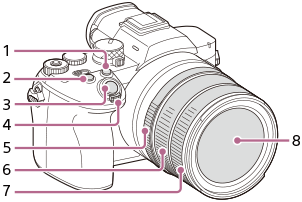
This is an illustration of the front side of the camera. The side with the lens is considered the front side of the camera. The lens, number 8, is in the center of the front side. Located diagonally above and to the left of the lens, there are buttons, etc. numbered 1 to 4. Rings around the lens are numbered 5 to 7 from the back.

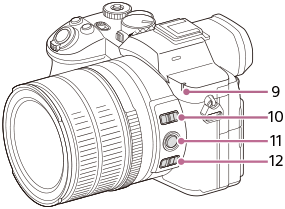
This is an illustration of the front side of the camera. The part numbered 9 is located at the top right of the lens. Parts numbered 10 to 12 are located on the right side of the lens, in order from top to bottom.

  1. C2 button (Custom button 2)
  2. C1 button (Custom button 1)
  3. Shutter button
  4. W/T (Zoom) lever
  5. Aperture ring
  6. Rear lens ring
  7. Front lens ring
  8. Lens
  9. Recording lamp/Self-timer lamp

    Do not cover this part during shooting.

  10. Focus mode switch
  11. Focus hold button
  12. Focus range limiter switch
TP1002213216