


The zoom features available with this product
The zoom feature of the product provides a higher magnification zoom by combining various zoom features. The icon displayed on the screen changes, according to the selected zoom feature.
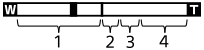
-
Optical zoom range
Images are magnified within the optical zoom range of this product. -
Smart Zoom range (
 )
)
Zoom images without causing the original quality to deteriorate by partially cropping an image (only when [JPEG Image Size]/[HEIF Image Size] is set to [M] or [S]). -
Clear Image Zoom range (
 )
)Zoom images using an image process with less deterioration.
When you set [
 Zoom Range] to [Clear Image Zoom] or [Digital Zoom], you can use this zoom function.
 -
Digital Zoom range (
 )
)You can magnify images using an image process.
When you set [
Zoom Range] to [Digital Zoom], you can use this zoom function.
Hint
- The default setting for the [Zoom Range] is [Optical zoom only].
- The default setting for the [JPEG Image Size]/[HEIF Image Size] is [L]. To use the smart zoom, change [JPEG Image Size]/[HEIF Image Size] to [M] or [S].
Note
- The Smart Zoom, Clear Image Zoom and Digital Zoom functions are not available when shooting in the following situations:
-
[
 File Format] is set to [RAW] or [RAW & JPEG]/[RAW & HEIF].
 - [Rec Frame Rate] is set to [120p]/[100p].
- During slow-motion/quick-motion shooting with the frame rate set to [240fps]/[200fps] or [120fps]/[100fps]
-
[
- You cannot use the Smart Zoom function with movies.
- When you use a zoom function other than the optical zoom in the still image shooting mode, the [Focus Area] setting is disabled and the AF operates with priority on and around the center area.
- When you use the Smart Zoom, Clear Image Zoom or Digital Zoom function, [Metering Mode] is locked to [Multi].
- When using the Smart Zoom, Clear Image Zoom or Digital Zoom function in the still image shooting mode, the following functions are not available:
- Subject Recognition AF
-
Face Priority in Multi Metering
- Tracking function