


Resetting the headset
If the headset cannot be turned on or cannot be operated even when it is turned on, reset the headset.
- Connect the headset to an AC outlet.
Use the supplied USB Type-C cable and a commercially available USB AC adaptor (A).
The charging indicator lights up in orange.
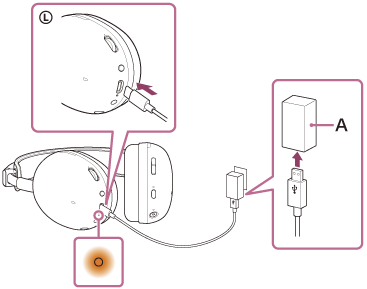
-
Press and hold the power button (B) and the Bluetooth button (C) for about 5 seconds.
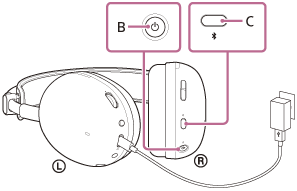
When the charging indicator goes out, the reset is complete. Release the power button and the Bluetooth button. The charging indicator lights up again.
The pairing information and other settings are retained.
If the headset does not operate correctly even after resetting, initialize the headset to restore factory settings.