


Functions for a phone call
The functions available during a call may vary depending on the profile supported by your smartphone. In addition, even if the profile is the same, the available functions may vary depending on the smartphone.
Depending on the connected device or the application you are using, the functions may not work properly even if you try to operate them with the headset.
Refer to the operating instructions supplied with the smartphone.
When the supported profiles are HFP and CCP
- HFP: Hands-free Profile
- CCP: Call Control Profile
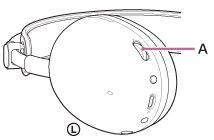
You can use the volume dial (A) to perform the following operating procedures.
-
To increase the volume
Turn the volume dial to the + side.
-
To lower the volume
Turn the volume dial to the – side.
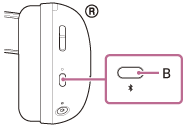
You can use the Bluetooth button (B) to perform the following operating procedures.
-
To receive a call
During an incoming call, press the Bluetooth button once briefly.
-
To reject a call
During an incoming call, press and hold the Bluetooth button for about 2 seconds.
-
To finish a call
During a call, press the Bluetooth button once briefly.
-
To cancel an outgoing call
During an outgoing call, press the Bluetooth button once briefly.
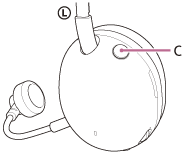
You can use microphone on or off button (C) to perform the following operating procedures.
-
To turn on the microphone
Press the microphone on or off button so that the button is pressed in.
-
To turn off the microphone
Press the microphone on or off button so that the button is pushed out.
When the supported profile is HSP
- HSP: Headset Profile
You can use the volume dial to perform the following operating procedures.
-
To increase the volume
Turn the volume dial to the + side.
-
To lower the volume
Turn the volume dial to the – side.
You can use the Bluetooth button to perform the following operating procedures.
-
To receive a call
During an incoming call, press the Bluetooth button once briefly.
-
To finish a call
During a call, press the Bluetooth button once briefly.
-
To cancel an outgoing call
During an outgoing call, press the Bluetooth button once briefly.
You can use microphone on or off button to perform the following operating procedures.
-
To turn on the microphone
Press the microphone on or off button so that the button is pressed in.
-
To turn off the microphone
Press the microphone on or off button so that the button is pushed out.