


Controlling the audio device (Bluetooth connection)
If your Bluetooth device supports the AVRCP profile’s operating function, the following operating procedures are available. The available functions may vary depending on the Bluetooth device, so refer to the operating instructions supplied with the device.
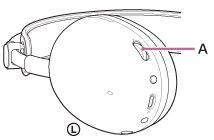
You can use the volume dial (A) to perform the following operating procedures.
-
To increase the volume
Turn the volume dial to the + side.
-
To lower the volume
Turn the volume dial to the – side.
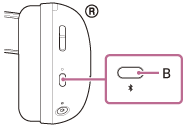
You can use the Bluetooth button (B) to perform the following operating procedures.
-
To play music
While paused, press the Bluetooth button once briefly.
-
To pause music
During playback, press the Bluetooth button once briefly.
-
To skip to the beginning of the next track
Press the Bluetooth button twice quickly. (
 )
) -
To skip to the beginning of the previous track (or the current track during playback)
Press the Bluetooth button 3 times quickly. (
)
Note
- If the communication condition is poor, the Bluetooth device may malfunction in response to the operating procedure on the headset.
- The available functions may vary depending on the connected device, the music software, or app used. In some cases, the device may function differently or may not work even if the above operating procedures described are performed.