


Connecting to a computer, PlayStation®5, or USB Type-C compatible smartphone via the USB transceiver
Before starting the operating procedure, check the following.
- The computer, PS5, or USB Type-C compatible smartphone is placed within 1 m (3.2 ft) of the headset.
- The headset is charged sufficiently.
- The operating instructions of the computer, PS5, or USB Type-C compatible smartphone is at hand.
-
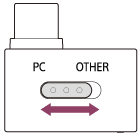
Switch the slide switch of the USB transceiver to “PC” or “OTHER” according to the connected device.
-
Turn on the computer, PS5, or USB Type-C compatible smartphone.
-
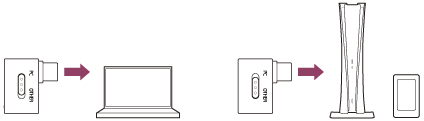
Connect the USB transceiver to a USB port of the computer, PS5, or USB Type-C compatible smartphone.
Note
- If the device does not recognize the headset microphone, make sure the slide switch of the USB transceiver is set correctly.
- If the wireless 2.4 GHz connection does not work, pair the headset with the USB transceiver manually. Press and hold the connect button on the USB transceiver and the power button on the headset for about 5 seconds or more.
Press the connect button with an object with a thin tip that will not break, like a paperclip. - During a call, there may be noise in the voice that the other party hears. Connecting the USB transceiver to a different USB port may improve the situation.