


Using the supplied headphone cable
You can use the headset as noise canceling headphones while the headset is connected to a device via the supplied headphone cable and the headset is turned on.
-
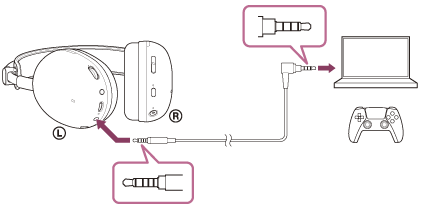
Connect a playback device to the headphone cable input jack with the supplied headphone cable.
Connect the 5-pole straight plug to the headset side and the 4-pole L-type plug to the device side.
The connecting device side is a CTIA compliant cable with 4-pole specifications including the microphone.
- CTIA: Cellular Telephone Industry Association
When connecting the headphone cable, perform the following.
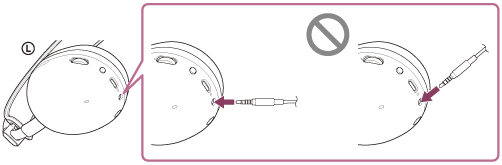
- Be sure to remove the headset from your ears.
- Hold the plug and insert it straight into the headphone cable input jack while checking its position.
Connecting the cable while wearing the headset, or inserting the plug at an angle into the jack, may damage the jack or cause a malfunction.
To adjust the volume
Operate on the side of the computer or other connected device.
To switch the microphone on or off
See “What you can do while connected to a game console”.
When the headset is turned off, the microphone itself is muted, but the microphone on or off indicator does not light up.
Hint
- You can listen to music even if the headset is turned off. In this case, the noise canceling function cannot be used.
- To use the noise canceling function/Ambient Sound Mode, turn the headset on.
Note
- Use the supplied headphone cable only.
- Make sure that you insert the cable until it clicks. If the plug is not connected correctly, you may not hear the sound properly.
- When using a headphone cable, the following functions cannot be used.
- USB transceiver
- Volume adjustment function
- GAME/CHAT BALANCE adjustment function
- Bluetooth function
- The noise canceling/Ambient Sound Mode button cannot be used when the headset is turned off.