


Listening to ambient sound while playing games (Ambient Sound Mode)
You can hear ambient sound through the microphones embedded in the left and right units of the headset while enjoying games.
-
Turn on the headset.
You will hear a notification sound indicating that the headset is turned on.
- Press the noise canceling/Ambient Sound Mode button (A) to switch to the Ambient Sound Mode.
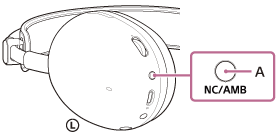
Each time the button is pressed, the function switches as follows.
The noise canceling function is enabled and Ambient Sound Mode is disabled.
You will hear a notification sound indicating that the function has switched.

Ambient Sound Mode is enabled and the noise canceling function is disabled.
You will hear a notification sound indicating that the function has switched.
The noise canceling function and Ambient Sound Mode are disabled.
You will hear a notification sound indicating that the function has switched.
Check the notification sound
It may not play on any browsers except the latest ones.
- When the noise canceling function is enabled
- When Ambient Sound Mode is enabled
- When the noise canceling function and Ambient Sound Mode are disabled
Hint
- Ambient Sound Mode settings changed with the “INZONE Hub” or “Sound Connect” app are stored in the headset. Once you change the settings, you can enjoy music with the stored settings just by enabling Ambient Sound Mode. This feature is available for devices that do not have the “INZONE Hub” or “Sound Connect” app installed.
- In the factory settings, the Ambient Sound Mode is disabled when the headset is turned on. This setting can be changed using the “INZONE Hub” or “Sound Connect” app.
- The “INZONE Hub” or “Sound Connect” app allows you to set a combination of the following three modes. If you select multiple modes, you can switch between them sequentially by pressing the noise canceling/Ambient Sound Mode button.
- Noise canceling function enabled
- Ambient Sound Mode enabled
- Noise canceling function and Ambient Sound Mode disabled
Note
- Depending on the ambient conditions and the type and volume of audio playback, ambient sounds may not be heard even when using Ambient Sound Mode. Remove the headset in areas where you are required to hear ambient sound. It is dangerous to wear the headset on roads where cars or bicycles are passing.
- If the headset is not being worn properly on your ears, the Ambient Sound Mode may not work correctly. Wear the headset properly.
- Depending on the surrounding environment, wind noise may increase when Ambient Sound Mode is activated. In that case, lower the volume of Ambient Sound Mode using the “INZONE Hub” or “Sound Connect” app. If the wind noise is still significant, disable Ambient Sound Mode.
- When Ambient Sound Mode is activated, if your fingers or hair touch the noise canceling function microphones, you may hear a loud sound.