


Launching the app (Game enhancer)
This app makes gameplay much more convenient with various functions.
While playing a game, you can tap the following icon to adjust the colors, display effects of displayed content, sounds, and more.
 (Floating icon)
Downloaded games are automatically stored in the Game enhancer app, and you can find and launch the games from “My games”.
- Launch the Game enhancer app.
 (Game enhancer)
Screen overview
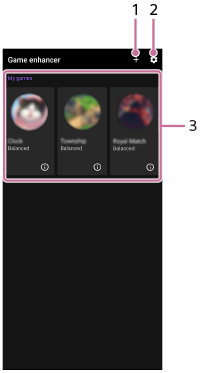
- Tap to add new games manually.
- Game enhancer settings
-
My games
Downloaded games will be automatically listed. Tap a game icon to start the game.
To view a screenshot or video taken by the Game enhancer app, tap the icon. (Game profile)
TP1002262957