


Sounds and tones
Setting the ringtone
You can set different ringtones for each SIM. You can also select a desired music file as a ringtone.
-
Find and tap as follows.
[Settings] > [Sound & vibration]
-
Select the SIM for which you want to set the ringtone.
[Phone ringtone - SIM 1] or [Phone ringtone - SIM 2]
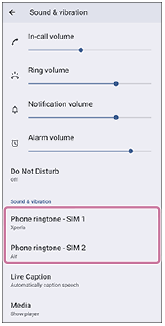
-
Select a sound from the list.
To select a music file that is not in the list, tap the following.
[Add ringtone]
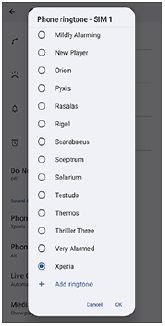
-
To confirm, tap the following.
[OK]
Setting the notification sound
-
Find and tap as follows.
[Settings] > [Sound & vibration] > [Notification sound]
-
Select a sound from the list.
To select a music file that is not in the list, tap the following.
[Add notification]
-
To confirm, tap the following.
[OK]
Hint
-
To turn off all ringtone and/or notification sounds and set your device to vibrate only, select the following from the list.
[None]