


Customizing the modes (Mode customization)
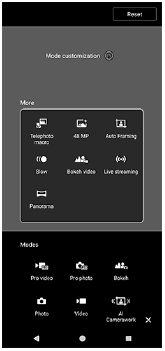
You can drag a mode icon to change its position. You can display frequently used modes at the bottom of the screen for quick access and store less frequently used modes on the following screen.
[More]
- Launch the Camera app.
 (Camera)
 -
Swipe the bottom of the screen and tap the following.
[More] -
Tap the icon.
 (Mode customization)
 -
Touch and hold the mode that you want to reassign or reorder, and then drag and drop it to the desired position.
-
Drag and drop frequently used modes into the following area at the bottom of the screen.
[Modes]
-
Drag and drop less frequently used modes into the following area.
[More]
-
TP1002270231